

Upgrade business security: a systematic guide for SMBs
TL;DR:
- Small businesses often have gaps in security due to piecemeal upgrades and lack of systematic processes.
- A thorough risk assessment and prioritized, documented upgrades help build a resilient security program.
- Ongoing monitoring, regular reassessment, and evidence-based practices ensure long-term security effectiveness.
Most small and midsize businesses intend to improve security. The problem is execution. You buy a new camera, update a password here and there, and assume the gaps are covered. They rarely are. Piecemeal upgrades create a false sense of protection while leaving real vulnerabilities in place. A systematic security-upgrade process treats security as a repeating cycle: assess, plan, implement, then monitor and reassess. This guide walks you through each stage so you can build a repeatable, evidence-based security program that actually holds up under pressure.
Table of Contents
- Assess current security risks
- Prioritize and plan security upgrades
- Implement and document upgrades
- Monitor, maintain, and reassess security
- A fresh perspective: Why ‘evidenced upgrades’ beat paper compliance
- Take the next step in securing your business
- Frequently asked questions
Key Takeaways
| Point | Details |
|---|---|
| Assess first | Start with a structured assessment to uncover your business’s true security risks. |
| Prioritize upgrades | Focus on foundational improvements like software updates, multi-factor authentication, and access controls. |
| Document evidence | Maintain logs, test records, and staff training as proof your upgrades are active—not just on paper. |
| Make it ongoing | Set a cadence of monitoring and reassessment to keep your business security strong over time. |
Assess current security risks
Every effective upgrade starts with knowing exactly what you’re dealing with. Before you buy anything or change any setting, you need a clear, documented picture of your current security posture. That means looking at both your physical environment and your digital systems together, not separately.
Start by creating an asset inventory. List everything that needs protection: servers, point-of-sale terminals, cash drawers, sensitive files, key entry points, and storage areas. Then document every control you currently have in place. This includes cameras, alarm systems, access badges, software firewalls, password policies, and backup schedules. Most businesses that do this exercise for the first time are surprised by how many gaps appear.
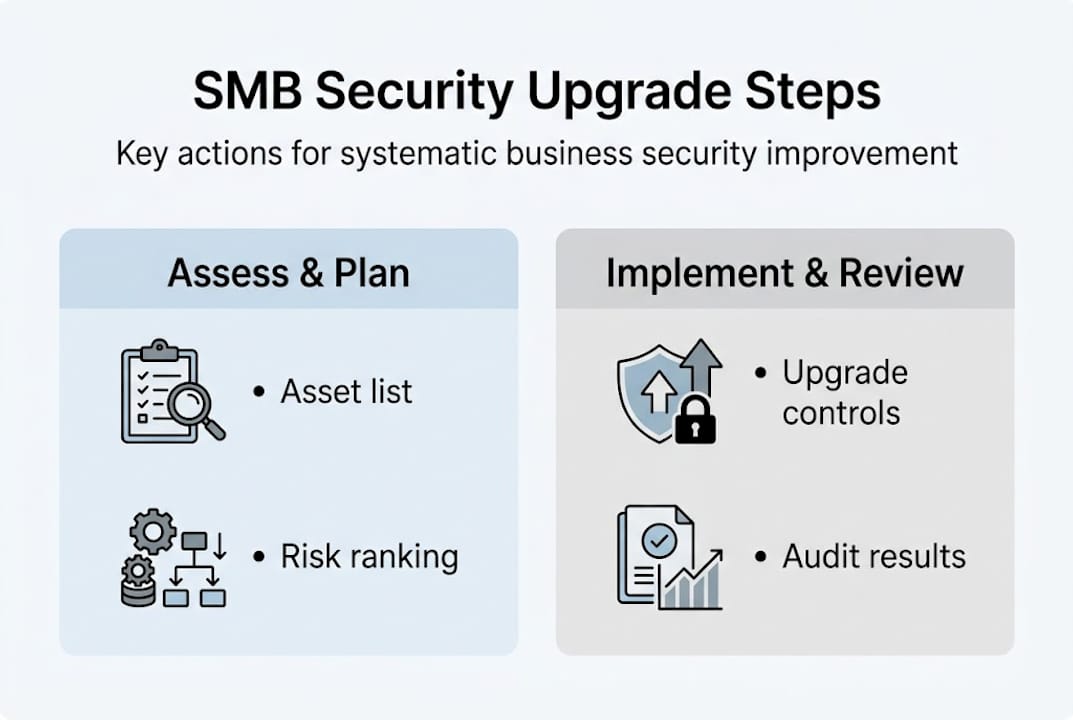
Here’s a simple framework to organize your assessment:
| Security area | What to check | Common gaps found |
|---|---|---|
| Physical access | Door locks, key control, badge systems | Shared keys, no access logs |
| Surveillance | Camera placement, recording storage | Blind spots, outdated footage retention |
| Cyber controls | Patch status, MFA, firewall rules | Unpatched software, no MFA enabled |
| Data protection | Backups, encryption, off-site storage | Infrequent backups, no encryption |
| Staff awareness | Training records, phishing test results | No training conducted in 12+ months |
Use a structured security audit checklist to make sure you don’t miss areas that seem low-risk but carry real exposure. Walk your physical space with fresh eyes. Stand at each camera and ask: what does this actually capture? Check whether recorded footage is stored long enough to be useful if an incident occurs.
For your digital side, CISA SMB resources provide no-cost tools that teach phishing avoidance, require MFA, update business software, enable logging, back up data, and encrypt sensitive information. These aren’t theoretical recommendations. They’re practical starting points designed specifically for businesses without a full IT department.
Key areas to flag during your assessment:
- Outdated software on any device connected to your network
- Missing or broken camera coverage at entry points and storage areas
- Weak access controls such as shared passwords or unused admin accounts
- No documented incident response plan for staff to follow
- Gaps in backup frequency that would leave you exposed after a ransomware attack
For a deeper walkthrough on assessing business security risks and structuring your findings, you’ll find that systematic documentation makes the next stage far easier.
Pro Tip: Involve two or three staff members in the risk walk-through. Employees who work daily in your space often spot overlooked issues, like a propped fire door or a camera that was repositioned but never realigned, that managers miss entirely.
Prioritize and plan security upgrades
Once you’ve mapped out your security risks, it’s time to plan and prioritize the controls you’ll upgrade. Not every gap carries equal weight. A missing camera in a low-traffic hallway is very different from an unpatched operating system on your point-of-sale server.
Rank each identified risk by three factors: potential financial impact, legal or regulatory exposure, and reputational damage if the vulnerability is exploited. This ranking tells you where to put limited resources first.
A phased improvement roadmap works best for SMBs. Choose a scoped set of systems, run your baseline assessment, execute time-boxed improvements, then reassess before moving to the next phase. This prevents the all-or-nothing thinking that stalls most security programs before they start.

Here’s a comparison of typical upgrade types by effort and impact:
| Upgrade type | Effort level | Risk reduction | Suggested timeline |
|---|---|---|---|
| Enable MFA on all accounts | Low | Very high | Week 1 |
| Apply outstanding software patches | Low | High | Week 1-2 |
| Review and update access control lists | Low-Medium | High | Week 2 |
| Reconfigure camera coverage | Medium | Medium-High | Week 2-4 |
| Install door access control system | High | High | Month 2-3 |
| Deploy encrypted cloud backup solution | Medium | Very high | Month 1-2 |
Your numbered plan should follow this logic:
- Fix critical software vulnerabilities and apply outstanding patches immediately.
- Enable MFA across all business accounts and remote access points.
- Audit and update physical access controls, including who holds keys or access codes.
- Reconfigure or add cameras to eliminate identified blind spots.
- Schedule encrypted backups and verify they restore correctly.
- Conduct staff security awareness training and document completion.
SMB guidance consistently emphasizes starting with foundational controls such as risk assessment, patching, MFA, and backups, and iterating rather than attempting a full overhaul at once. This approach works because it produces visible, measurable wins that build momentum.
For more context on the full business case, see why upgrade security systems and how it affects liability, insurance premiums, and staff confidence.
Pro Tip: Set a 30-day sprint for your first round of upgrades. Commit only to what you can realistically complete in that window. Finishing five controls well beats planning twenty and executing none.
Implement and document upgrades
With priorities set, let’s get into executing your security upgrades in a way that truly makes a difference. Buying tools is not the same as implementing them. A camera in a box protects nothing. A policy document sitting on a shared drive changes nothing.
Follow this sequence for each upgrade:
- Deploy the change according to your plan (patch the software, enable MFA, reposition the camera, update the access list).
- Test it immediately. Log in with a test account to confirm MFA triggers. Stand in the camera’s field of view to confirm coverage. Trigger your alarm to confirm it alerts correctly.
- Document with evidence. Take a screenshot, photograph the camera angle, print the access log. File it with a date stamp.
- Communicate to staff. Issue updated codes, run a short training session, and confirm who to contact if something breaks.
- Schedule a follow-up check at 30 and 90 days to confirm the control is still operating as intended.
For digital upgrades, regular software patch management and ongoing updates based on changing threats are foundational. Don’t treat patching as a one-time event. Threats evolve, and so do the vulnerabilities they exploit.
“Many security programs fail not because controls weren’t purchased, but because they were never consistently executed. Auditable evidence, logs, completed training records, and physical test results, is what separates real protection from paper compliance.” Small Business Cybersecurity Checklist
For access control and identity protection, consider a structured approach to multi-factor security implementation. If you’re newer to the concept, a plain-English breakdown of second-factor authentication can help you choose the right method for your setup.
Common mistakes to avoid during implementation:
- Assuming the upgrade works without testing it in a real scenario
- Skipping staff communication, which creates confusion and workarounds that undermine new controls
- No documentation, meaning you have no proof the upgrade was completed if an incident or audit occurs
- Setting and forgetting, rather than scheduling follow-up checks
CISA SMB tools also include incident response planning resources that pair well with implementation to make sure your staff knows what to do if a control fails or a breach is detected.
Monitor, maintain, and reassess security
Upgrading security isn’t a one-time task. Here’s how to make improvements stick through proactive monitoring and reassessment.
Once controls are in place, your job shifts to keeping them working. Systems degrade. Staff changes. Business hours shift. New threats emerge. A security upgrade that isn’t actively maintained will drift back toward ineffectiveness within months.
Establish a regular maintenance routine that includes:
- Weekly: Confirm backup jobs completed successfully. Check camera feeds for positioning and image quality.
- Monthly: Review access logs for anomalies. Verify that no unauthorized accounts were added. Confirm patch status across devices.
- Quarterly: Test alarms, confirm camera angles still cover intended zones, and audit who holds physical access credentials.
- Semiannually: Conduct a full reassessment using your original checklist. The systematic upgrade cycle repeats here: reassess, replan, and implement the next round of improvements.
Semiannual security assessments should include testing alarms, checking camera angles, evaluating lighting, auditing access logs, and walking the property to identify blind spots or damaged equipment. This isn’t optional maintenance. It’s how you prevent slow drift back to vulnerability.
Adapt your program whenever the business changes. New hires need access provisioned and training completed before day one, not after. New operating hours may leave entry points unmonitored. A new product line might mean new inventory worth protecting.
For practical frameworks on sustaining these habits, review commercial security best practices and industry security best practices that apply specifically to SMB environments. You can also use a structured business security monitoring checklist to keep your reviews consistent across cycles.
Pro Tip: Assign one person the role of security owner, even if it’s not their primary job. Give them a written checklist and a calendar of review dates. Accountability by name gets completed. Accountability by assumption doesn’t.
A fresh perspective: Why ‘evidenced upgrades’ beat paper compliance
To complete the cycle, let’s step back and look at what separates successful upgrades from check-the-box efforts.
Here’s what we see consistently: businesses invest time and money in a security plan, buy the right tools, and then consider the job done. The plan exists. The tools are purchased. The policy is written. On paper, everything looks solid.
Then something goes wrong, and the investigation reveals that MFA was never actually enforced, the camera was still pointed at the ceiling from installation day, and the last completed staff training was two years ago.
Paper compliance is a real and costly trap. The way out isn’t more planning. It’s treating every upgrade as something that must be operated and evidenced, not just purchased and filed. Logs, test records, training certificates, and dated photographs are what create actual protection. They’re also what your insurer or a regulatory auditor will ask for when it matters most.
The security programs that hold up aren’t necessarily the most sophisticated. They’re the ones where someone ran the test, filed the result, and did it again three months later. That discipline is worth more than any individual tool. For businesses serious about the long-term security system impact, the evidence trail is the program.
Take the next step in securing your business
You’ve seen how to build and sustain security upgrades. Here’s where to find help and vetted solutions.
At Safes and Security Direct, we specialize in professional-grade security products built for businesses that take protection seriously. From surveillance cameras and alarm systems to fire-resistant and burglary-resistant safes, our catalog is built around the needs of SMB owners who want reliable, durable solutions backed by real expertise.
Start by working through the business security checklist to identify your highest-priority gaps and match them to the right products. If you’d prefer a guided approach, our team is available to help you design a custom upgrade plan that fits your site, your risk profile, and your budget. You don’t need to figure this out alone.
Frequently asked questions
What is the first step in the business security upgrades process?
The first step is a thorough risk assessment of your current security posture across both physical and digital areas. A structured upgrade cycle always begins with assessing and identifying risks before any planning or purchasing takes place.
How often should businesses reassess their security measures?
At minimum, reassess every six months. Semiannual reviews should include alarm tests, camera checks, access log audits, and a physical walk-through to catch blind spots or equipment issues before they become vulnerabilities.
What are the most important security upgrades for small businesses?
The highest-impact upgrades are enabling MFA, applying outstanding software patches, maintaining consistent encrypted backups, and improving physical access controls. Regular patch management and CISA’s essentials including MFA, logging, and encryption, form the baseline every SMB should meet first.
How do I know if my security upgrades are effective?
Effective upgrades leave a paper trail. Track logs, completed test results, and staff training records, then verify them during scheduled reviews. Treating upgrades as operating and evidenced rather than simply purchased is what separates real security from compliance theater.
Recommended
- Business security checklist 2026: protect your SME assets – Safes and Security Direct
- Business Security Needs: Protecting Assets in 2026 – Safes and Security Direct
- Physical Security for SMEs: Protecting Assets and Growth – Safes and Security Direct
- How to Assess Business Security Risks and Protect Assets – Safes and Security Direct
- Why medical facility hygiene matters: A guide for SMBs