

Two-factor security explained: boost your digital protection
TL;DR:
- Two-factor authentication requires two distinct verification methods from different categories to enhance security.
- 2FA significantly reduces automated attacks but has limitations against targeted social engineering and SIM swaps.
- Using hardware security keys and authenticator apps provides the highest protection, especially for sensitive accounts.
Passwords feel safe until they aren’t. 81% of breaches come from stolen or weak credentials, meaning a strong password alone gives you far less protection than most people assume. Two-factor security, often called 2FA, adds a second verification step that stops attackers cold even when they already have your password. Whether you manage a home network, run a small business, or protect sensitive financial accounts, understanding how 2FA works, which methods are worth using, and where it falls short will help you make smarter, more confident security decisions.
Table of Contents
- What is two-factor security?
- Types of two-factor methods
- How effective is two-factor security?
- Pitfalls, risks, and how to use 2FA safely
- Expert perspective: What most guides get wrong about two-factor security
- Protect your accounts and assets with smarter security
- Frequently asked questions
Key Takeaways
| Point | Details |
|---|---|
| Passwords aren’t enough | Single-factor authentication leaves most accounts vulnerable to attack. |
| 2FA blocks most attacks | Two-factor security prevents 99.9% of automated breaches and dramatically lowers risk. |
| Choose strong methods | Authenticator apps and hardware keys are safer than SMS or email codes for two-factor security. |
| Know 2FA’s limits | Implementation flaws and advanced attacks can still succeed—use layered defenses and secure recovery options. |
| Apply 2FA everywhere | Protect important personal and business accounts by enabling two-factor security wherever possible. |
What is two-factor security?
Two-factor security is exactly what it sounds like: you prove your identity in two separate ways before gaining access to an account or system. Think of it like a bank vault that requires both a combination and a physical key. One without the other gets you nowhere.
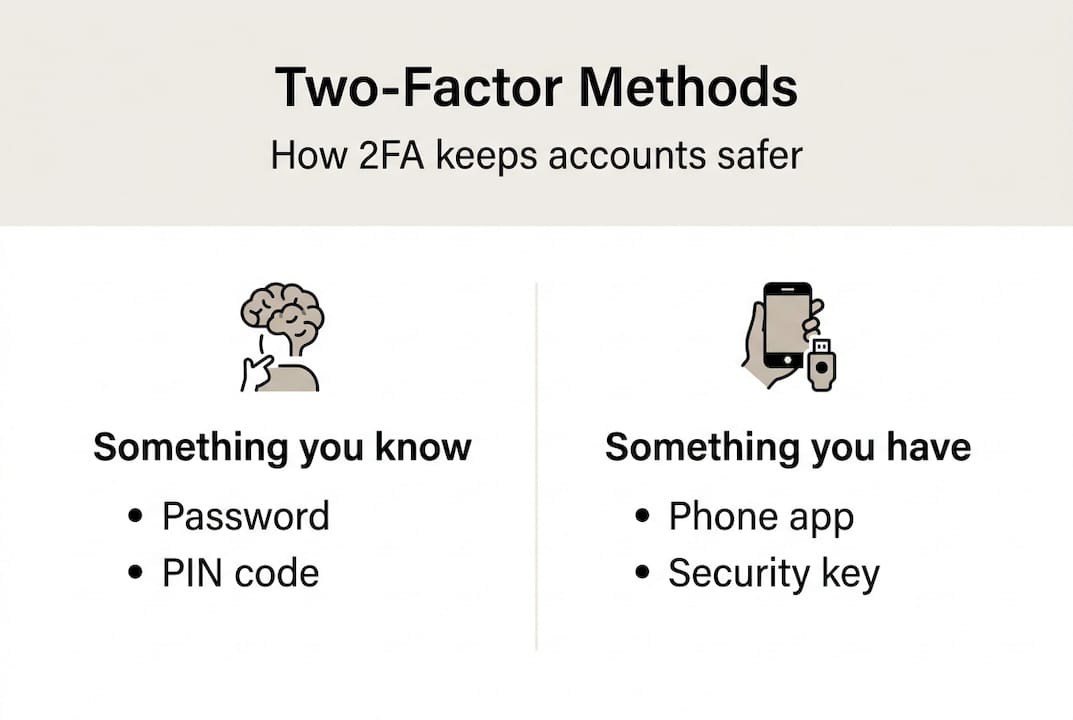
The technical definition is straightforward. 2FA requires two distinct authentication factors drawn from different categories. Those categories are:
- Something you know: A password, PIN, or security answer
- Something you have: A phone, hardware token, or smart card
- Something you are: A fingerprint, face scan, or voice recognition
Single-factor authentication relies on just one of these, almost always a password. Two-factor authentication combines any two from different categories. Combining two “something you know” items, like a password and a security question, does not qualify as true 2FA because both come from the same category.
Here is a real-world comparison. You log into your email with just a password. An attacker who bought your credentials from a data breach logs in just as easily. Now imagine you also have an authenticator app. The attacker enters your password correctly but gets blocked because they don’t have your phone. That second factor is the wall between your data and the breach.
It is also worth separating 2FA from multi-factor authentication (MFA). MFA is the broader term, covering any system that requires two or more factors. 2FA is a specific version of MFA using exactly two. Our multi-factor security guide covers the full spectrum if you want to go deeper.
The NIST authentication guidelines provide the authoritative framework for how authentication factors should be categorized and implemented. Following these standards helps organizations avoid the most common design mistakes.
“Each additional authentication factor you add doesn’t just double your security, it multiplies the difficulty for an attacker exponentially.”
The core logic is simple: attackers typically compromise one factor at a time. Requiring a second factor from a completely different category forces them to run two separate attacks simultaneously, which is far harder to pull off at scale.
Types of two-factor methods
Not all two-factor methods are created equal. Different 2FA methodologies vary significantly in security strength, ease of use, and resistance to phishing. Here is a breakdown of the most common options:
| Method | Security level | Phishing resistant | Best for |
|---|---|---|---|
| SMS code | Low | No | Basic personal accounts |
| Email code | Low | No | Low-risk logins |
| Authenticator app (TOTP) | Medium-High | Partial | Personal and small business |
| Push notification | Medium | No | Corporate environments |
| Hardware key (FIDO2) | Very High | Yes | High-value accounts, enterprise |
| Biometrics | High | Yes | Device-level access |
| Passkeys | Very High | Yes | Modern consumer and business apps |
NIST organizes authentication strength into three Authenticator Assurance Levels (AAL). AAL1 accepts single-factor methods. AAL2 requires two factors, typically including a hardware-bound or app-based authenticator. AAL3 demands hardware-based proof of possession and is reserved for the most sensitive access scenarios, like government systems or financial infrastructure.
For most personal users, an authenticator app like Google Authenticator or Authy is a solid AAL2-level choice. For businesses managing access to critical systems, hardware security keys that meet the top MFA methods compared standard for FIDO2 are the gold standard.
Here is a quick summary of when to use each method:
- Personal accounts (email, social media): Authenticator app or passkey
- Small business systems: Authenticator app or push notification with device binding
- Enterprise or high-value access: Hardware key (FIDO2) at AAL3
- Low-risk, convenience-focused: SMS or email code as a minimum baseline
Pro Tip: Avoid SMS-based 2FA for anything sensitive. SIM-swapping attacks, where a criminal convinces your carrier to transfer your number to their device, can bypass SMS codes entirely. A time-based one-time password (TOTP) app or hardware key is a much safer choice and is just as fast once you get used to it.
Understanding these distinctions is part of building a broader security vocabulary. Reviewing home security terminology can help you connect digital and physical security concepts in a unified way.
How effective is two-factor security?
The numbers are striking. 99.9% of automated attacks are blocked when 2FA is enabled, and organizations that deploy it see up to a 99% reduction in credential-based breaches. These are not theoretical figures. Microsoft reported that accounts with MFA enabled were more than 99 times less likely to be compromised compared to those relying on passwords alone.

| Attack type | 2FA effective? | Notes |
|---|---|---|
| Credential stuffing | Yes | Stolen passwords useless without second factor |
| Phishing (generic) | Partial | TOTP codes can still be intercepted in real time |
| Brute force | Yes | Second factor blocks even if password is guessed |
| SIM swap | No | Defeats SMS-based 2FA |
| MFA fatigue | No | Targets push notification systems |
| Social engineering | Partial | Depends on user awareness |
2FA is particularly powerful against the most common attack types. Credential stuffing, where attackers test massive lists of leaked username and password combinations against multiple sites, is almost entirely neutralized. Password spray attacks, where one common password is tried across thousands of accounts, hit the same wall.
The benefits extend to smart home security as well. Smart locks, cameras, and home automation hubs are increasingly targeted because they often share credentials with email or cloud accounts. Adding 2FA to those accounts closes a gap that physical security alone cannot address.
Here is a quick summary of what 2FA protects against and where it has limits:
- Protects against: Credential stuffing, brute force, password leaks, automated bots
- Reduces risk of: Generic phishing, unauthorized account access
- Limited against: Targeted social engineering, real-time phishing proxies, SIM swaps
- Does not replace: Strong passwords, device security, asset protection methods like encrypted storage
The takeaway is that 2FA is one of the highest-return security investments you can make, but it works best as part of a layered strategy rather than a standalone fix.
Pitfalls, risks, and how to use 2FA safely
Many organizations enable 2FA but remain vulnerable because of poor implementation, user friction, or gaps in recovery planning. Knowing the failure points is just as important as knowing the benefits.
Here are the most common pitfalls to avoid:
- Relying on SMS codes for high-risk accounts. SIM-swapping attacks are increasingly common, and telecom carriers are not immune to social engineering. If your 2FA is SMS-based, an attacker who convinces your carrier to port your number gets your codes.
- Ignoring MFA fatigue. Push notification-based 2FA can be defeated by bombarding a user with approval requests until they accidentally or impatiently tap “approve.” This is a known attack vector against corporate accounts.
- Neglecting recovery options. Losing access to your 2FA device without backup codes or a recovery method can lock you out permanently. This is one of the most common real-world problems with 2FA adoption.
- Using the same device for password and 2FA. If your phone stores both your password manager and your authenticator app, a compromised device defeats both factors at once.
- Skipping 2FA for “low-value” accounts. Attackers use low-value accounts as stepping stones to reach higher-value targets through password reuse or account recovery chains.
For businesses, the right approach involves MFA implementation pitfalls awareness combined with adaptive MFA. Adaptive MFA adjusts the level of authentication required based on context: logging in from a new device or unusual location triggers stricter verification, while a recognized device on a trusted network may require less friction.
A well-designed security camera setup for your business is only as strong as the account protecting its cloud access. Pairing physical security investments with high security solutions at the digital layer closes the loop.
Pro Tip: Store your backup recovery codes in a physically secure location, like a fireproof safe, not in a cloud document or email folder. If your 2FA device is stolen or lost, those codes are your only way back in.
Expert perspective: What most guides get wrong about two-factor security
Most 2FA advice stops at “just turn it on.” That is well-intentioned but dangerously incomplete. The method you choose matters as much as the decision to use 2FA at all. Someone who enables SMS-based 2FA on their business banking account and feels protected has created a false sense of security, not real safety.
True security is a risk assessment exercise. Ask yourself: how valuable is this account to an attacker? How sophisticated are the threats you realistically face? How much friction can you tolerate daily? A personal social media account and a corporate payroll system do not need the same level of protection.
Adaptive MFA is the answer most guides overlook. It balances security and usability by scaling verification to actual risk, not applying the same rule to every login. This approach reduces user fatigue while maintaining strong protection where it counts.
Overconfidence is the other trap. 2FA is powerful, but it is one layer in a stack. Physical security, device hygiene, and account monitoring all matter. Explore our multi-factor security resources to build a complete picture rather than relying on any single control.
Protect your accounts and assets with smarter security
You now have a clear picture of how two-factor security works, which methods are worth trusting, and where the real risks hide. Applying this knowledge is the next step toward genuinely stronger protection for your accounts and your property.
At Safes and Security Direct, we believe digital and physical security belong in the same conversation. Protecting your valuables with a high-quality safe or surveillance system is only part of the picture. Securing the accounts that control those systems matters just as much. Browse our multi-factor security guide to keep building your knowledge, and explore our full range of security solutions designed for homes and businesses that take protection seriously.
Frequently asked questions
Is two-factor authentication really necessary for personal accounts?
Yes. 2FA blocks 99.9% of automated attacks, making it one of the single most effective steps you can take to prevent account takeovers on personal accounts.
Is SMS-based 2FA secure?
SMS-based 2FA is better than no second factor, but SMS OTP is vulnerable to SIM-swapping attacks and should be replaced with an authenticator app or hardware key for any sensitive account.
What should I do if I lose my 2FA device?
Contact your provider immediately and use your pre-saved backup recovery codes to regain access. Recovery lockouts are a serious risk, so always store backup codes in a secure, offline location before you need them.
Can two-factor authentication be bypassed?
Weak implementation leads to bypasses, especially with SMS or push-based methods. Using phishing-resistant options like FIDO2 hardware keys significantly reduces this risk for sensitive accounts.
How does 2FA improve smart home security?
Adding 2FA to smart home accounts protects against unauthorized access even when passwords are leaked, as 2FA enhances access protection for home automation systems and connected devices.
Recommended
- What is multi-factor security? Complete 2026 guide – Safes and Security Direct
- Why layer security solutions for effective protection 2026 – Safes and Security Direct
- What is physical security? 85% risk reduction explained – Safes and Security Direct
- Why Invest in High Security Solutions – Safes and Security Direct