

How to secure property effectively: A practical guide
Every year, property crimes affect millions of homeowners and small businesses, resulting in significant financial losses and emotional distress. Whether you own a home or run a small business, protecting your assets from theft, vandalism, and damage requires more than just locking your doors. Effective property security involves a strategic approach that combines risk assessment, the right equipment, proper installation, and ongoing maintenance. This guide will walk you through each critical step to help you build a comprehensive security plan that protects what matters most to you.
Table of Contents
- Key takeaways
- Preparing to secure your property: assessing risks and needs
- Essential tools and materials for property security
- Step-by-step execution: installing and configuring your security system
- Maintaining and verifying your property security over time
- Explore safe and security solutions tailored for your property
- Frequently asked questions
Key Takeaways
| Point | Details |
|---|---|
| Assess risks and needs | Begin by walking the property at different times to identify vulnerabilities, understand risks, and set clear security objectives. |
| Physical and electronic security | Combine strong locks and sensors with cameras, alarms, and smart alerts to deter crime and document activity. |
| Prioritize assets and areas | Create a tiered list of vulnerable spots and high value assets to guide budget and installation focus. |
| Choose the right equipment | Select devices appropriate for your property type and avoid paying for features you do not need. |
| Maintain and evaluate regularly | Schedule ongoing maintenance and periodic reviews to keep systems effective and adaptable to new risks. |
Preparing to secure your property: assessing risks and needs
Before purchasing a single security device, you need to understand your property’s unique vulnerabilities. Effective property security starts with assessing vulnerabilities and understanding specific risks that apply to your location and situation. Walk around your property at different times of day, noting areas that feel exposed or poorly lit. Pay special attention to ground-floor windows, side doors, and back entrances that might offer concealed access points.
Your assessment should consider several factors. First, identify physical weak points like old locks, flimsy door frames, or windows without sensors. Second, evaluate your property type because a standalone house faces different risks than a storefront or warehouse. Third, research local crime statistics to understand whether you’re in an area with higher rates of burglary, vandalism, or other property crimes. This information helps you prioritize where to invest your security budget.
Set clear objectives for what you want to achieve. Do you primarily need to deter criminals from attempting entry? Are you focused on detecting intrusions quickly so you can respond? Or do you want comprehensive monitoring that records everything happening on your property? Different goals require different tools and strategies.
Pro Tip: Create a simple sketch of your property layout marking all entry points, blind spots, and valuable asset locations. This visual reference becomes invaluable when planning camera placement and sensor coverage.
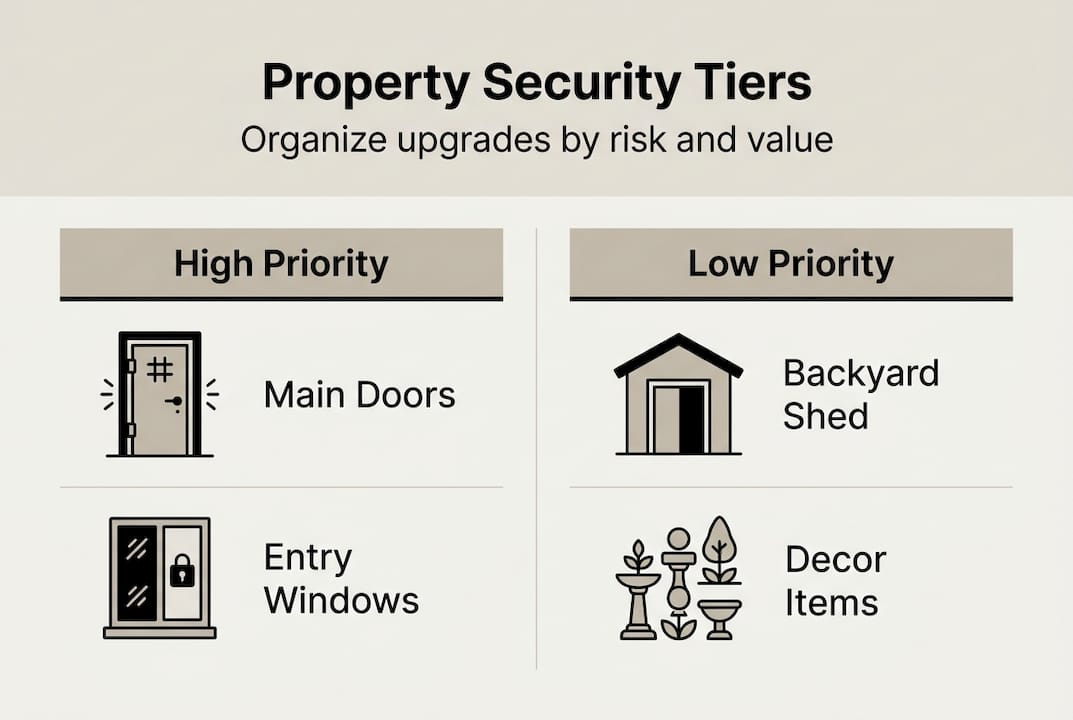
Consider creating a tiered priority list. Start with the most vulnerable areas or those protecting your highest-value assets. For homeowners, this might be the master bedroom where jewelry is kept or a home office with expensive electronics. For small businesses, focus on cash registers, inventory storage, or areas with customer data. This prioritization ensures that even with a limited budget, you protect what matters most first.
Essential tools and materials for property security
Once you understand your risks, selecting the right security equipment becomes much simpler. The security market offers everything from basic deadbolts to sophisticated AI-powered camera systems, so knowing what you actually need prevents overspending on unnecessary features.
Physical security devices form your first line of defense. High-quality deadbolts, reinforced strike plates, and security bars create barriers that delay or prevent forced entry. Investing in high-quality security hardware reduces the risk of unauthorized access significantly. Safes protect valuables, important documents, and irreplaceable items from both theft and fire damage. Window and door sensors alert you immediately when someone attempts entry.
Electronic security systems add detection and documentation capabilities. Security cameras record activity, providing evidence if incidents occur and deterring criminals who notice them. Modern systems include motion-activated lights, audible alarms, and smartphone alerts that notify you instantly of suspicious activity. Smart doorbells let you see and speak with visitors remotely, while glass break sensors detect the sound frequency of breaking windows.
| Security Tool | Primary Function | Typical Cost Range | Best For |
|---|---|---|---|
| Deadbolt Locks | Physical barrier | $50-$200 | All entry doors |
| Security Cameras | Surveillance and evidence | $100-$500 per camera | Perimeter monitoring |
| Motion Sensors | Intrusion detection | $30-$100 each | Interior spaces |
| Smart Alarm System | Alert and response | $200-$800 | Comprehensive coverage |
| Fire-Resistant Safe | Asset protection | $300-$2,000 | Valuables storage |
The distinction between professional-grade and consumer products matters more than many people realize. Professional equipment typically offers better durability, longer warranties, and more reliable performance under stress. Consumer devices work well for basic needs but may lack the robustness required for high-risk environments or commercial applications.
When selecting equipment, match each device to the specific vulnerability it addresses. A camera watching your driveway needs different specifications than one monitoring a dimly lit alley. Outdoor devices must withstand weather extremes, while indoor sensors can prioritize sensitivity over weatherproofing. Top home security products include locks, alarms, cameras, and safes that work together as an integrated system.
Pro Tip: Buy equipment that works together on a single platform whenever possible. Mixing brands often creates compatibility headaches and prevents you from managing everything through one app or control panel.
Don’t overlook supporting materials like mounting hardware, cable management supplies, and backup power sources. A security camera is useless if it falls off the wall during a storm or goes dark when power fails. Quality installation materials and uninterruptible power supplies ensure your security investment continues working when you need it most.
Step-by-step execution: installing and configuring your security system
Proper installation determines whether your security investment actually protects your property or just creates a false sense of safety. Proper installation and configuration are critical for security system effectiveness, so following best practices during setup pays long-term dividends.
Step 1: Prepare your installation sites. Clean all mounting surfaces thoroughly to ensure adhesives bond properly. Check that door frames and walls can support the weight of cameras and sensors. For outdoor installations, verify that mounting locations provide adequate coverage while remaining accessible for future maintenance. Mark drill holes carefully, using a level to ensure cameras point where you intend.
Step 2: Install physical security upgrades first. Replace standard screws in door hinges with longer security screws that penetrate deep into the door frame. Install deadbolts according to manufacturer specifications, ensuring the bolt extends fully into the strike plate. Mount safes to floor joists or wall studs using heavy-duty bolts, never relying solely on the safe’s weight for security. Test all mechanical components before proceeding to electronics.
Step 3: Set up electronic detection systems. Position cameras to cover entry points with clear, unobstructed views. Avoid pointing cameras directly at bright lights or reflective surfaces that cause glare. Install motion sensors in corners at recommended heights, typically seven to eight feet, angled downward to cover room interiors. Place door and window sensors on the frame side that opens, ensuring magnets align properly when closed.
Step 4: Configure system settings and connectivity. Connect devices to your network following security best practices like changing default passwords immediately. Set up user accounts with appropriate permission levels, giving family members or employees only the access they need. Configure alert preferences to balance security with convenience, avoiding so many notifications that you start ignoring them. Test each device’s connection and response before considering installation complete.
“The weakest link in any security system is improper installation. A $500 camera mounted carelessly provides less protection than a $100 camera installed correctly.”
Common installation mistakes can undermine even the best equipment. Mounting cameras too high reduces facial recognition accuracy. Placing motion sensors near heating vents or air conditioners causes false alarms. Running network cables without proper weatherproofing leads to moisture damage and connection failures. Using inadequate mounting hardware means devices fall or shift out of position over time.
Safety Warning: Always turn off power at the circuit breaker before installing wired security devices. Use proper ladder safety techniques when working at heights, and consider hiring professionals for installations requiring electrical work or roof access.
Document your installation with photos and notes about device locations, settings, and any unique configuration details. This documentation becomes invaluable when troubleshooting issues or expanding your system later. Keep all warranty information and user manuals in one accessible location, either physically or in a cloud storage folder.
Maintaining and verifying your property security over time
Installing a security system marks the beginning, not the end, of protecting your property. Ongoing maintenance and verification prevent system failures and improve long-term security by catching problems before they leave you vulnerable.
Schedule regular system tests at least monthly. Walk through your property triggering each sensor to verify it sends alerts correctly. Review camera footage to ensure views remain clear and unobstructed by growing vegetation or shifted equipment. Test backup power systems by briefly disconnecting main power to confirm devices switch to battery operation smoothly. Check that all family members or employees still remember how to arm, disarm, and respond to alerts.
| Monitoring Approach | Advantages | Disadvantages | Best Suited For |
|---|---|---|---|
| Professional Monitoring | 24/7 coverage, expert response | Monthly fees, less control | High-value properties |
| Self-Monitoring | No recurring costs, full control | Requires constant attention | Tech-savvy owners |
| Hybrid System | Flexibility, backup coverage | Complexity, moderate cost | Small businesses |
Physical maintenance keeps devices functioning properly. Clean camera lenses quarterly to maintain clear image quality. Replace batteries in wireless sensors before they die, typically annually. Tighten mounting hardware that vibrates loose over time. Trim vegetation that blocks camera views or creates false motion alerts. Lubricate mechanical locks and hinges to prevent binding that might suggest tampering.
Software updates deserve equal attention to hardware maintenance. Manufacturers regularly release firmware updates that patch security vulnerabilities, improve performance, and add features. Enable automatic updates when available, or check manually every three months. Outdated software creates backdoors that sophisticated criminals can exploit to disable your security system remotely.
Keep detailed records of all security-related events and maintenance activities. Note when sensors trigger, what caused alerts, and how you responded. Track maintenance dates, software updates, and any system modifications. This log helps identify patterns like recurring false alarms that need addressing and provides evidence if you ever need to file insurance claims or police reports.
Pro Tip: Set calendar reminders for quarterly security reviews. Use this time to assess whether your current setup still matches your needs or if life changes require adjustments to coverage areas or alert settings.
Periodically reassess your security needs as circumstances change. A growing business may need additional cameras covering expanded inventory areas. New neighbors or changes in local crime patterns might warrant upgrading certain components. Technology advances quickly in the security industry, so every few years evaluate whether newer solutions offer significant improvements worth the investment.
Explore safe and security solutions tailored for your property
Protecting your property effectively requires the right combination of knowledge, equipment, and ongoing vigilance. Now that you understand how to assess risks, select appropriate tools, install systems correctly, and maintain them over time, you’re ready to put these principles into action.
At Safes and Security Direct, we specialize in providing homeowners and small business owners with professional-grade security solutions designed to protect what matters most. Our extensive selection includes everything from fire-resistant safes and advanced surveillance cameras to complete alarm systems and access control devices. Whether you’re securing a family home or a commercial property, our products combine reliability, durability, and cutting-edge technology.
Explore our safe and security solutions to find equipment that matches your specific needs and budget. Looking for targeted advice? Check out our guide on security solutions for urban homeowners or dive deeper with our comprehensive home security guide for 2026. Our team stands ready to help you build a security system that provides genuine peace of mind.
Frequently asked questions
How often should I review and update my property security system?
Review your security system quarterly to verify all components function correctly and coverage remains adequate for your needs. Conduct more thorough evaluations annually or whenever significant changes occur, such as moving valuable assets, experiencing a security incident, or noticing increased crime in your area. Technology evolves rapidly, so every three to five years assess whether newer solutions offer meaningful improvements in reliability, features, or cost effectiveness that justify upgrades.
What are the most cost-effective security measures for small businesses?
Focus on multipurpose devices that address multiple vulnerabilities simultaneously. Quality door locks, motion-activated cameras covering key areas, and audible alarms provide strong protection without excessive costs. Prioritize protecting high-value inventory and cash handling areas first, then expand coverage as budget allows. Regular maintenance of existing equipment often delivers better value than constantly purchasing new devices. Consider exploring asset protection methods that balance upfront investment with long-term security benefits.
How do I choose between smart and traditional security systems?
Your decision should balance convenience, technical comfort, and monitoring preferences. Smart systems offer remote access, instant alerts, and integration with other home automation, but require stable internet and regular software updates. Traditional systems provide reliable local operation without connectivity dependencies but lack remote management capabilities. Many homeowners find hybrid approaches work best, combining smart cameras for monitoring with traditional alarms for core protection. Learn more about smart home security advantages to determine which features matter most for your situation.
What are common mistakes to avoid when securing property?
Improper device placement ranks among the most frequent errors, such as mounting cameras where glare obscures views or positioning sensors where pets trigger false alarms. Neglecting regular maintenance allows batteries to die and software to become outdated, creating security gaps. Many people also fail to test their systems regularly, discovering malfunctions only during actual emergencies. Avoid using default passwords, which criminals easily exploit, and don’t advertise your security measures with prominent alarm company signs that reveal which system you use. Finally, remember that even the best equipment fails without proper installation, so follow manufacturer guidelines carefully or hire qualified professionals.
Recommended
- How to protect valuables at home: strategies for 2026 – Safes and Security Direct
- Top Asset Protection Methods 2026 for Secure Homes – Safes and Security Direct
- How to secure business premises effectively in 2026 – Safes and Security Direct
- Why invest in asset protection: cut risks by 40% in 2026 – Safes and Security Direct
- Property Drainage Issues – Protecting Your Home