

Alarm system basics: Protecting homes and businesses made simple
TL;DR:
- Alarm systems significantly reduce burglary risk, but proper use and maintenance are essential for protection.
- Understanding system components, monitoring options, and installation types helps owners choose the best setup.
Properties with alarm systems are 300% less likely to be burglarized compared to unprotected ones, yet millions of homeowners and business owners still put off installing a system because the choices feel overwhelming. Between sensor types, monitoring plans, wired versus wireless setups, and a flood of technical jargon, it’s easy to stall. This guide cuts through all of that. You’ll get a clear breakdown of how alarm systems work, what they’re made of, and a practical framework for choosing the setup that fits your property, lifestyle, and budget.
Table of Contents
- What makes up a modern alarm system?
- Monitored vs. self-monitored: Which is right for you?
- Wired vs. wireless systems: Installation and performance
- Common pitfalls: False alarms, maintenance, and police response
- Best practices for maximizing your alarm system’s benefits
- The real key: It’s not the tech, it’s your habits
- Secure your peace of mind with the right alarm system
- Frequently asked questions
Key Takeaways
| Point | Details |
|---|---|
| Core system components | Every alarm system includes sensors, a control panel, alert devices, and a communication method. |
| Monitoring matters | Professional monitoring offers greater reliability and insurance savings, while self-monitoring can fit lower-risk needs. |
| Choose right installation | Wired, wireless, or hybrid systems each have specific benefits for different property types and situations. |
| Combat false alarms | Proper placement, use of verification tools, and regular maintenance minimize false alarms and improve emergency response. |
| Habits drive results | The best system relies on consistent use, care, and integrating modern verification for true security. |
What makes up a modern alarm system?
Every alarm system, regardless of brand or price, is built on the same core architecture. Understanding alarm system components before you shop gives you a major advantage. You’ll know what you’re paying for, and you won’t be talked into features you don’t need.
Alarm systems consist of sensors, a control panel, keypads or apps, sirens, and communication modules, and each part plays a specific role in detecting and responding to a threat. Think of it like a team: the sensors are the scouts, the control panel is the coach, and the siren is the final whistle.
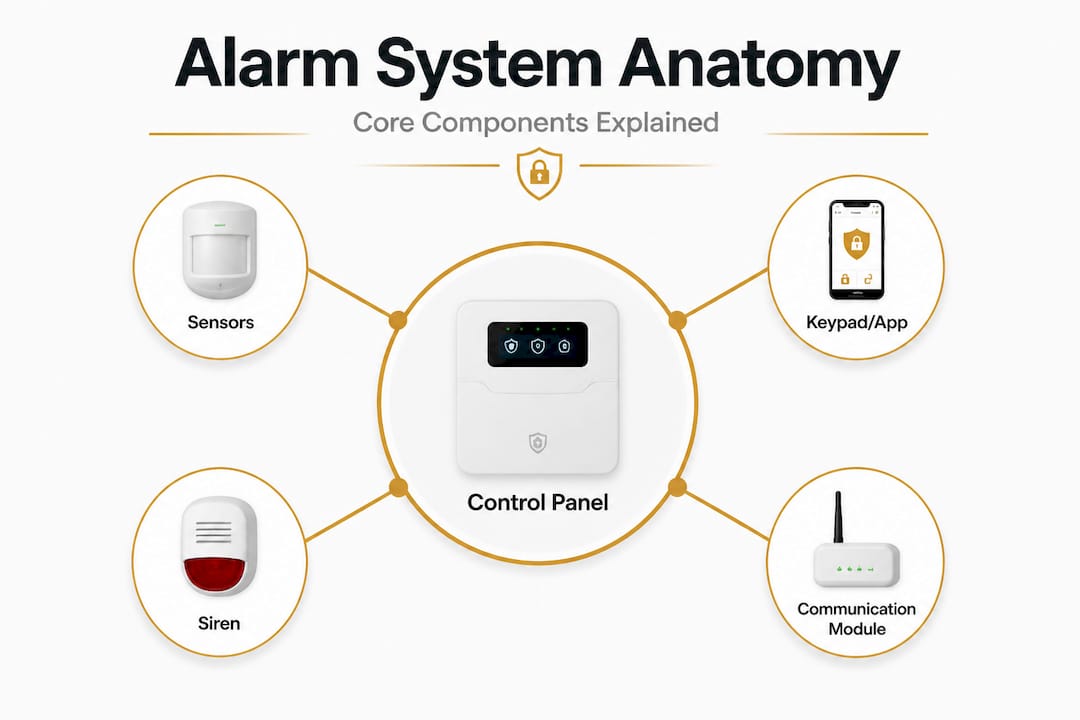
Here’s a breakdown of what each component does:
| Component | Function |
|---|---|
| Door/window sensors | Detect when an entry point is opened |
| Motion detectors | Sense movement within a defined area |
| Glass-break sensors | Recognize the sound or vibration of shattering glass |
| Control panel | Processes all signals from sensors and coordinates responses |
| Keypad or app | Allows users to arm and disarm the system |
| Siren or strobe | Triggers a loud alert to scare off intruders and notify neighbors |
| Communication module | Sends alerts via phone, internet, or cellular to you or a monitoring center |
Arming means activating the system so it will detect and respond to triggers. Disarming means deactivating it so normal movement doesn’t trigger alerts. Most modern systems let you arm in two modes: “away” (all sensors active) and “stay” (perimeter only, so you can move inside freely).
Common sensor placements that matter most include:
- Front and back doors: These are the entry points used in most break-ins
- Ground-floor windows: Especially in low-visibility areas like side alleys
- Interior hallways: Motion detectors here catch intruders who bypass door sensors
- Garages: Often overlooked but frequently targeted
Understanding security terminology explained early on saves time and prevents confusion when you’re evaluating products or reading monitoring contracts. You can also explore home security basics for a broader overview of how these systems fit into a layered security plan.
Pro Tip: Place sensors at every ground-floor entry point before worrying about interior sensors. Most burglars are stopped at the perimeter.
Monitored vs. self-monitored: Which is right for you?
Once you understand the parts, the next major decision is how your system handles alerts when something goes wrong. This is the monitored versus self-monitored question, and it affects both cost and real-world protection.
Monitored systems connect to 24/7 professional centers for verification and dispatch; self-monitored systems send alerts directly to your phone. That difference has huge practical implications.
| Feature | Monitored | Self-monitored |
|---|---|---|
| 24/7 response | Yes, by a professional team | No, relies on you |
| Monthly cost | $20 to $60 per month | Free or very low cost |
| Police/fire dispatch | Automatic after verification | You call yourself |
| Insurance discount | Up to 20% average | Usually not applicable |
| Best for | Travelers, larger properties, businesses | Tech-savvy users, small budgets |
| Response if you miss alert | Center handles it | Threat goes unaddressed |
Monitored alarms deter 83% of burglars, and insurance discounts average 20%, which means the monthly fee often pays for itself in policy savings alone. For a business owner with inventory or expensive equipment, that calculation tips heavily toward professional monitoring.
Here are the top scenarios when each option makes the most sense:
- You travel frequently: Monitored wins. You can’t always grab your phone at 3 a.m.
- You own a business with employees: Monitored wins. Liability and asset value justify the cost.
- You rent and have a tight budget: Self-monitored makes sense with a reliable wireless system.
- You have a vacation property: Monitored wins. No one is nearby to respond.
- You’re security-conscious and always near your phone: Self-monitored can work.
Exploring the advanced security system benefits of professional monitoring goes well beyond deterrence. Some monitoring centers provide carbon monoxide, fire, and flood response too, making them a broader safety net.
Pro Tip: If you travel more than two weeks per year or own a property you don’t live in full-time, professional monitoring is almost always the better investment.
Wired vs. wireless systems: Installation and performance
System monitoring is just one decision. How your system is physically installed is another crucial factor that affects reliability, cost, and flexibility.
Wired systems are best for new builds and high-security needs; wireless suits retrofits and renters; hybrid systems balance both. Each has genuine advantages depending on what you’re working with.
Wired systems run physical cables between sensors and the control panel. They’re immune to signal interference and don’t rely on batteries, making them extremely reliable over time. The downside is installation complexity. Routing cables through walls is much easier during construction than after.

Wireless systems communicate via radio frequency or Wi-Fi. They install quickly with no structural changes needed, which is why they dominate the rental and retrofit market. The tradeoff is battery maintenance and potential signal vulnerability in dense urban environments.
Hybrid systems use a wired backbone for critical sensors and wireless add-ons for scalability. This is a popular choice for businesses that need high reliability in core areas but also want the flexibility to expand coverage easily.
Key considerations for each type:
- Wired pros: No battery replacements, no signal interference, more tamper-resistant
- Wired cons: Expensive to retrofit, professional installation usually required
- Wireless pros: Easy install, portable if you move, no drilling or wall damage
- Wireless cons: Battery dependency, potential signal jamming risk in rare cases
- Hybrid pros: Best of both, scalable without full rewiring
- Hybrid cons: Higher upfront planning required
When you compare wired vs wireless security options, reliability and context matter more than any blanket recommendation. For businesses with dedicated facilities, wired often makes more long-term sense. For homeowners in rental units, the flexibility of wireless is usually the right call.
“The right system isn’t the most expensive one. It’s the one that matches your property’s physical layout, your risk level, and your willingness to maintain it consistently.” — Security Systems Authority
If you’re leaning toward wireless, understanding battery powered alarm systems in detail will help you avoid one of the most common failure points: a sensor that stops working simply because no one checked its battery in two years.
Pro Tip: Set a calendar reminder every six months to check battery levels in every wireless sensor. Most system failures are caused by dead batteries, not technology breakdowns.
Common pitfalls: False alarms, maintenance, and police response
Choosing and setting up a system is just the beginning. Maintaining its integrity is equally important for real-world protection, and false alarms are the number one threat to that integrity.
The scale of the problem is striking. 94 to 98% of police responses to alarms are false, and in some cities, police have adopted “verified response” policies where they won’t dispatch until a video or audio check confirms a real threat. That means an unverified alarm might not bring anyone to your door at all.
False alarms stem from pets, weather, low batteries, and user error, while unverified alarms may be ignored by police in some areas. Here are the most common causes in order of frequency:
- Pets: Dogs and cats trigger motion sensors. A 50-pound dog moving near a poorly calibrated sensor is a guaranteed false alert.
- User error: Forgetting to disarm before entering, or entering the wrong code under pressure.
- Dead batteries: A sensor with a low battery can send erratic signals before going dark.
- Weather and environmental changes: Strong wind rattling a door sensor, or temperature extremes affecting sensor calibration.
- Poor sensor placement: Sensors too close to air vents, windows with direct sunlight, or high-traffic areas.
Video and audio verification has become the most effective solution. Verified alarms reduce unnecessary calls by 90%, and AI-driven technology reduces false alarms by up to 70%. Systems with smart verification with cameras can automatically analyze footage before flagging a real alert to your monitoring center or directly to you.
“Alarm verification technology is transforming police response protocols. Departments are increasingly prioritizing verified calls, making camera integration no longer optional for serious security.” — POP Center Research
The cost of repeated false alarms isn’t just inconvenience. Many municipalities fine property owners for excessive false alarm dispatches, and repeated calls can erode your relationship with local emergency services.
Best practices for maximizing your alarm system’s benefits
Understanding what goes wrong sets up the positive side: how to make your alarm system perform at its best, consistently, over the long term.
Consistent arming, proper sensor placement, and ongoing maintenance are the true drivers of alarm system effectiveness. Technology is only as good as the habits built around it.
Here are the core best practices every property owner should follow:
- Arm your system every single time: Most break-ins happen because the system was simply not turned on
- Test your system monthly: Trigger each sensor intentionally to confirm it communicates with the control panel
- Update emergency contacts: Ensure your monitoring center has current phone numbers and access instructions
- Replace batteries proactively: Don’t wait for a low-battery warning. Set a schedule and stick to it
- Keep your entry delay short: A long delay between triggering a sensor and sounding the alarm gives intruders more time to act
- Secure your control panel: A panel placed near the front door can be disabled quickly. Mount it in a less accessible location
Adding cameras to your setup is one of the highest-value upgrades you can make. Understanding the benefits of live security camera integration shows how real-time footage transforms your system from a reactive tool into a proactive one. Cameras don’t just record events. They deter crime before it starts, provide verification during an alert, and give you remote visibility 24 hours a day.
Lighting integration is another underrated layer. Motion-activated lights around entry points make your property less attractive to anyone testing your defenses after dark. Combined with cameras and a properly maintained alarm, this creates the visible, layered deterrence that makes burglars choose a different target entirely.
Pro Tip: Add an AI-powered camera or smart doorbell that can distinguish between a human, a vehicle, and a pet. These devices cut notification fatigue dramatically and give you alerts that actually mean something.
The real key: It’s not the tech, it’s your habits
Here’s something most security vendors won’t say directly: the most expensive alarm system on the market won’t protect you if you don’t arm it, maintain it, or take it seriously. We’ve seen this pattern repeatedly, and it’s worth being direct about.
Burglars don’t have time to test your system’s specifications. They look for visual deterrence, hesitate at signs of an active security presence, and move on quickly. A modest system that’s consistently armed, clearly visible, and well-maintained will outperform a sophisticated setup that collects dust because it’s too complicated to use daily.
The research on alarm impact strategies consistently shows that the behavioral side of security matters just as much as the technical side. Habits like arming before bed, checking battery status monthly, and updating your monitoring contacts annually create compounding protection over time.
Think of your alarm system the way you think about smoke detectors. You wouldn’t install them and then remove the batteries because they went off once during cooking. The inconvenience is part of the cost of being protected. The difference with alarm systems is that the cost of neglecting them isn’t theoretical. It shows up as a break-in, a missing asset, or a business interruption at the worst possible time.
The brands and price points matter far less than consistency. Pick a system that fits your life and property, learn to use it properly, and make maintenance a routine. That’s the real foundation of effective security.
Secure your peace of mind with the right alarm system
Now that you understand the fundamentals and the real-world strategies behind effective alarm systems, the next step is putting that knowledge into action for your specific property.

At Safes and Security Direct, we offer a carefully selected range of alarm systems, surveillance cameras, and integrated security solutions designed for both homes and businesses. Whether you’re starting from scratch or upgrading an existing setup, our product range covers every scenario from compact wireless systems for apartments to robust monitored setups for commercial properties. Browse our full security catalog to find the right system for your needs, compare specifications side by side, and get the protection your property deserves. Our team is here to help you make a confident, informed decision.
Frequently asked questions
Do alarm systems really prevent burglaries?
Homes with alarm systems are 300% less likely to be burglarized compared to unprotected properties, making them one of the most proven deterrents available.
What causes most false alarms?
Most false alarms come from pets, weather changes, user error, and dead batteries in wireless sensors, all of which are preventable with proper setup and regular maintenance, according to common false alarm triggers.
Can an alarm lower my insurance premium?
Yes, professionally monitored alarm systems typically earn average insurance discounts of about 20%, which can offset a significant portion of monthly monitoring fees.
What’s better for apartments: wired or wireless?
Wireless systems are the clear choice for apartments because they install without structural changes and can move with you, as confirmed by guidance on wireless for renters.
Are police always dispatched for alarms?
In many areas, police only respond to alarms verified by video or audio evidence due to the overwhelming rate of false dispatches, meaning unverified alarms may not trigger a response at all.
Recommended
- Alarm systems: Essential roles, real impact, strategies – Safes and Security Direct
- Home security best practices: protect property in 2026 – Safes and Security Direct
- Home security terminology explained: a clear guide – Safes and Security Direct
- Security system features list: Essential options for homes & businesse – Safes and Security Direct
- Complete Guide to Home Security Basics
- Alarm Monitoring: Strengthening Property Security Compliance - A To Z Locksmith Inc