

What Is Video Surveillance? Systems, Types, and Benefits
TL;DR:
- Video surveillance integrates cameras, recorders, and VMS software to monitor and analyze activity effectively. Modern systems rely on IP cameras and scalable storage solutions, with proper planning crucial for performance and legal compliance. Many systems fail in investigation due to poor placement, inadequate configuration, or network and storage issues.
Video surveillance is the use of security cameras and related equipment to monitor, record, and analyze activity in designated areas for safety, security, and operational purposes. The industry also refers to this as closed-circuit television (CCTV) or IP camera networking, depending on the technology involved. A complete video surveillance system definition goes beyond the camera itself. It includes recording devices like Digital Video Recorders (DVRs) or Network Video Recorders (NVRs), monitors, cabling or network infrastructure, and Video Management System (VMS) software. Homes, retail stores, warehouses, hospitals, and public transit systems all rely on these systems to deter crime, collect evidence, and monitor operations around the clock.
What is video surveillance and how does it work as a system?
Video surveillance uses security cameras to monitor and record activity in specific areas, delivering either live footage or stored recordings for review. The system does not begin and end with the camera. Every effective deployment integrates cameras, recording hardware, storage, and software into a single functioning unit.
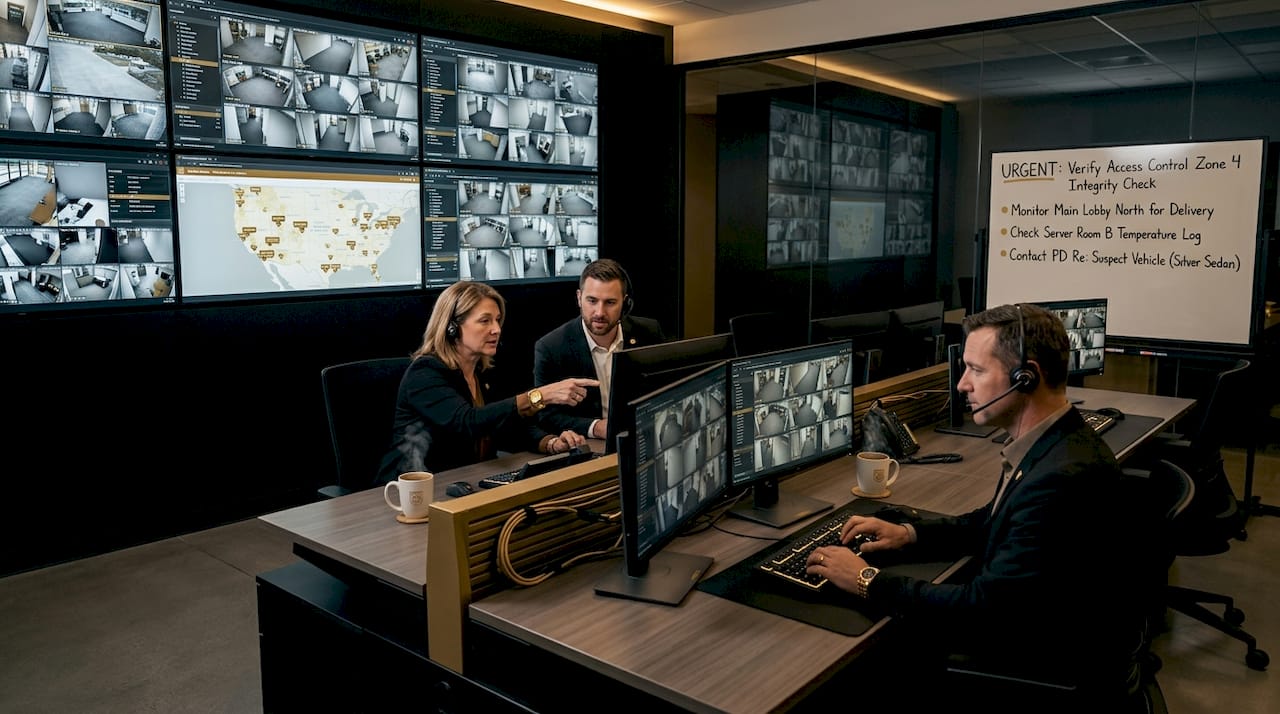
The core components of any fixed-site video security setup are cameras, monitors, recording devices, and a retrieval method. Minimum components for fixed-site security include these four elements, and skipping any one of them creates a gap that undermines the entire system. A camera that records but cannot be searched is nearly useless for an investigation.
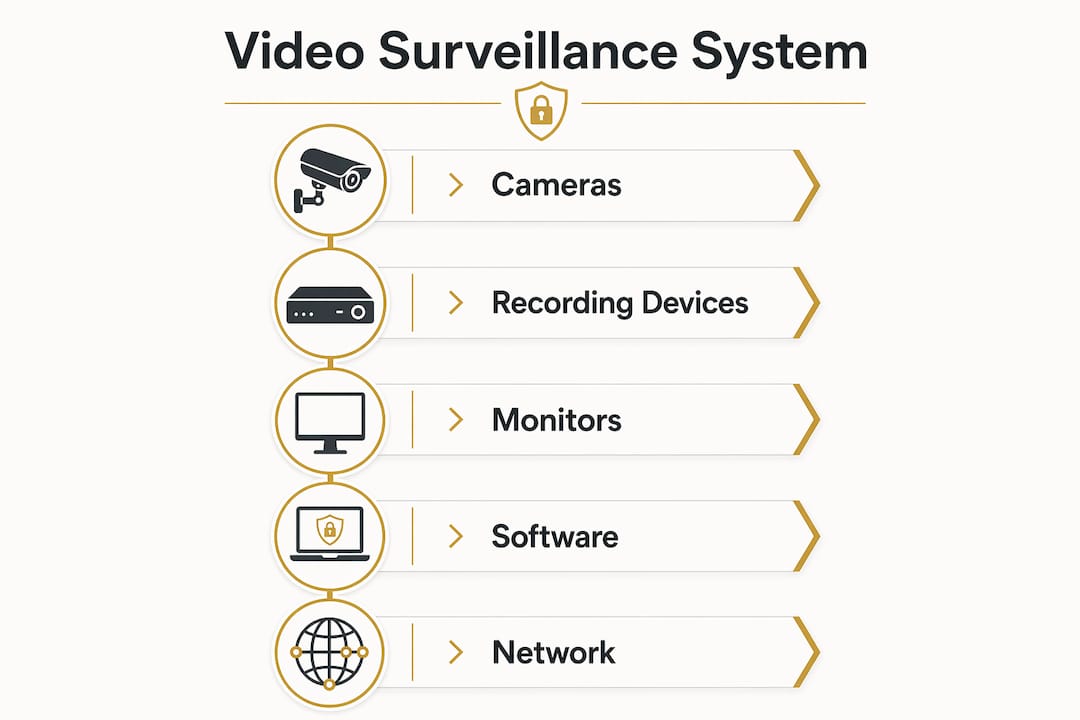
Modern systems also incorporate VMS software, which manages live viewing, playback, recording schedules, and integrations with access control or alarm systems. VMS integrates live viewing and recording management into a single operational layer, making it the brain of the system rather than an optional add-on. Without VMS, you have hardware. With it, you have a security system.
What components make up a video surveillance system?
The hardware layer of a video surveillance system breaks down into three categories: capture devices, transmission infrastructure, and recording or storage units.
Capture devices are the cameras themselves. Two main types exist:
- Analog cameras transmit a continuous video signal over coaxial cable to a DVR, which digitizes the footage before storing it.
- IP cameras digitize video at the camera itself and send compressed data packets over an Ethernet network to an NVR or directly to a VMS.
Analog cameras send signals to DVRs for digitization; IP cameras digitize at the camera and transmit over Ethernet. This distinction matters because IP systems support remote access, higher resolution, and advanced analytics, while analog systems are simpler and often less expensive to retrofit into older buildings.
Recording devices store the footage. DVRs handle analog inputs; NVRs handle IP camera streams. The choice between them drives the rest of your architecture decisions, from cabling type to storage capacity planning.
VMS software sits above the hardware and is the component most buyers underestimate. VMS software manages recording, playback, and integration, distinguishing a basic recorder from a fully operational security platform. Platforms like Milestone XProtect, Genetec Security Center, and Avigilon Control Center each offer different levels of analytics, scalability, and third-party integration.
One area that often gets overlooked is audio. Audio recording introduces legal issues that vary by state and country, so organizations must evaluate compliance requirements before enabling microphones on any camera.
Pro Tip: Before purchasing cameras, confirm whether your building’s existing cabling supports analog or IP systems. Retrofitting the wrong camera type to existing infrastructure can double your installation cost.
How does video surveillance technology work?
The signal path from camera lens to stored footage differs significantly between analog and IP systems, and understanding that path helps you make smarter decisions about performance and reliability.
In an analog system, the camera captures light through its lens, converts it to an electrical signal, and sends that signal over coaxial cable to a DVR. The DVR digitizes the signal, compresses it using a codec like H.264, and writes it to a hard drive. The entire digitization process happens at the recorder, which means the camera itself stays relatively simple and inexpensive.
In an IP system, the camera contains its own image sensor and processor. It captures, digitizes, and compresses video internally before sending it as data packets over a standard Ethernet network. IP camera systems digitize at the edge, which requires careful network planning to manage bandwidth, latency, and packet loss. A poorly configured network switch or an undersized router can cause dropped frames or delayed footage, which is a serious problem during an incident review.
| Feature | Analog (DVR) | IP (NVR/VMS) |
|---|---|---|
| Digitization point | At the DVR | At the camera |
| Transmission medium | Coaxial cable | Ethernet / Wi-Fi |
| Remote access | Limited | Full, via network |
| Analytics support | Minimal | Advanced (AI-based) |
| Typical resolution | Up to 1080p | Up to 4K and beyond |
| Cost to install | Lower upfront | Higher upfront |
Storage is the third pillar of how these systems function. On-premises DVR and NVR storage remains the most common approach, but hybrid on-premises and cloud architectures are gaining ground because they balance cost, scalability, and redundancy. Cloud storage allows footage retrieval from any location and protects recordings if on-site hardware is stolen or damaged.
Pro Tip: Calculate your storage needs before buying. A single 4K camera recording continuously at 30 frames per second can consume 100GB or more per day. Multiply that across a multi-camera system and you will need a serious storage plan from day one.
What are the different types of video surveillance systems?
Video surveillance configurations range from a single residential camera to enterprise-grade networks covering hundreds of locations. The right type depends on the environment, the threat level, and the operational goals.
Video surveillance systems deter crime and gather forensic evidence across homes, businesses, and public spaces. Here is how the main types break down by use case:
- Residential CCTV: Fixed cameras at entry points, driveways, and garages. Typically analog or consumer-grade IP cameras connected to a DVR or cloud service. Ideal for homeowners who want camera deterrence for theft and package theft prevention.
- Commercial IP networks: Multi-camera IP systems covering retail floors, warehouses, parking lots, and server rooms. Managed by VMS software with role-based access for security staff.
- Public space surveillance: City-operated networks using PTZ (pan-tilt-zoom) cameras and license plate recognition (LPR) technology. These systems feed into centralized monitoring centers and often integrate with law enforcement databases.
- Critical infrastructure: Airports, power plants, and data centers deploy layered systems combining fixed cameras, thermal imaging, and AI-based intrusion detection. Redundancy and uptime are non-negotiable in these environments.
Systems are planned to optimize coverage of risk points rather than simply placing cameras wherever convenient. A well-designed residential system covers the front door, back entrance, garage, and any blind spots along the perimeter. A retail system prioritizes point-of-sale terminals, stock rooms, and exit doors.
Emerging applications include AI-powered behavioral analytics, which flag unusual activity in real time, and license plate recognition systems that automate access control in parking facilities. These are no longer enterprise-only features. Consumer-facing platforms like Arlo and Ring now offer basic motion analytics to homeowners.
What are the benefits and challenges of video surveillance?
The benefits of video surveillance are concrete and well-documented across residential and commercial settings. The challenges are equally real and require deliberate planning to manage.
Core benefits:
- Crime deterrence: Visible cameras reduce the likelihood of theft, vandalism, and unauthorized access. The presence of a camera changes behavior before an incident occurs.
- Forensic evidence: Recorded footage provides time-stamped, location-specific evidence for law enforcement and insurance claims.
- Operational monitoring: Businesses use cameras to monitor workflow, verify safety compliance, and identify process inefficiencies in warehouses and manufacturing floors.
- Remote visibility: IP-based systems allow owners and managers to check live feeds from a smartphone, which is particularly valuable for multi-site operations.
You can explore the practical benefits of room surveillance in more detail if you are evaluating indoor camera placement for your home or office.
Common challenges:
- Privacy and legal compliance: Recording in areas where individuals have a reasonable expectation of privacy can expose organizations to legal liability. Audio recording introduces compliance risks that video-only systems avoid, but even video recording in bathrooms, locker rooms, or private offices is illegal in most jurisdictions.
- Storage costs: High-resolution, continuous recording generates enormous data volumes. Without a clear retention policy, storage costs grow unchecked.
- Cybersecurity exposure: IP cameras connected to a network are potential attack vectors. Default passwords and unpatched firmware are the two most common entry points for attackers targeting surveillance systems.
- Maintenance overhead: Cameras accumulate dirt, lenses shift, and hard drives fail. A system that is not actively maintained degrades in quality without anyone noticing until footage is needed.
How to choose and manage a video surveillance system effectively
Selecting and running a video surveillance system requires decisions across six areas. Work through them in order to avoid costly mistakes.
- Define your coverage goals first. Identify the specific areas you need to monitor, the lighting conditions in each zone, and the level of detail required. A camera covering a parking lot needs a wide-angle lens and low-light capability. A camera monitoring a cash register needs a narrow field of view and high resolution.
- Choose the right camera type for each location. Fixed dome cameras work well indoors. Bullet cameras handle outdoor perimeters. PTZ cameras cover large open areas where operators need to track movement. Thermal cameras detect heat signatures in complete darkness.
- Match your recorder to your camera type. Analog cameras require a DVR. IP cameras require an NVR or a VMS with direct camera ingestion. Mixing camera types on a single recorder is generally not supported without a hybrid DVR/NVR unit.
- Plan storage before you buy. Calculate daily data output per camera, multiply by camera count, and add a 30% buffer for peak recording periods. Hybrid cloud and on-premises storage gives you local speed for real-time access and cloud redundancy for disaster recovery.
- Invest in VMS software that matches your scale. A two-camera home system can run on a consumer app. A 50-camera commercial system needs enterprise VMS with role-based access, audit logs, and API integrations. Good video surveillance focuses on investigative usefulness, not just video capture, and VMS is where that usability lives.
- Audit your network infrastructure for IP systems. Confirm that your switches support Power over Ethernet (PoE) if you are using PoE cameras, check available bandwidth on each network segment, and segment camera traffic onto a dedicated VLAN to reduce cybersecurity exposure.
Metadata indexing allows rapid search without re-watching hours of footage, which is a capability worth prioritizing in any VMS selection. When an incident occurs, the ability to search by time, camera, or detected event type cuts investigation time from hours to minutes.
Key takeaways
Video surveillance is a complete ecosystem of cameras, recorders, network infrastructure, and VMS software. Treating it as anything less produces systems that capture footage but cannot support real investigations.
| Point | Details |
|---|---|
| System definition | Video surveillance includes cameras, DVR/NVR recorders, monitors, and VMS software working together. |
| Analog vs. IP | Analog digitizes at the DVR; IP digitizes at the camera, enabling remote access and advanced analytics. |
| Storage planning | Hybrid cloud and on-premises storage balances cost, scalability, and redundancy for growing systems. |
| Legal compliance | Audio recording carries jurisdiction-specific legal risks that must be evaluated before deployment. |
| VMS is the brain | VMS software determines whether footage is searchable and usable, not just stored. |
Why most surveillance systems fail before an incident even happens
I have reviewed a lot of surveillance setups over the years, and the pattern is almost always the same. The cameras are installed, the DVR is running, and the owner considers the job done. Then something happens, and the footage is either too blurry to identify anyone, stored on a drive that failed six months ago, or simply not covering the angle that mattered.
The uncomfortable truth is that most video surveillance systems are designed for the installation day, not for the investigation day. Lens placement, lighting, resolution settings, and retention policies are afterthoughts. Effective surveillance depends on forensic usability, not just camera count. A single well-placed, properly configured camera with adequate storage and a working VMS is worth more than ten cameras that produce unusable footage.
My other consistent observation is that IP camera buyers underestimate the network. These systems are not plug-and-play in any meaningful sense. Bandwidth, switch capacity, VLAN configuration, and firmware update schedules all affect whether the system performs when you need it. Treat the network as part of the security system, not as background infrastructure.
Finally, privacy compliance is not a legal formality. It is a design constraint. Build it into your system from the start, particularly if you are considering audio recording or cameras in shared spaces. The cost of retrofitting a compliant system is always higher than designing one correctly the first time.
— Chetna
Protect your property with the right surveillance system
Safesandsecuritydirect carries a full range of surveillance cameras, recorders, and accessories selected for both residential and commercial applications. Whether you are building a system from scratch or upgrading existing hardware, the product catalog covers IP cameras, DVR and NVR kits, and mounting hardware suited to every environment.

If you are just starting out, the CCTV protection guide on the Safesandsecuritydirect blog walks through how to match camera types to specific locations in your home or business. For those ready to browse hardware, visit the Safesandsecuritydirect store to compare models by resolution, recording type, and price. The team is available to help you configure a system that fits your coverage goals and budget.
FAQ
What is video surveillance in simple terms?
Video surveillance is the use of cameras and recording equipment to monitor and document activity in a specific area for security or operational purposes. It includes the camera, recorder, storage, and software needed to capture and retrieve footage.
How does video surveillance work technically?
Analog cameras send video signals over coaxial cable to a DVR, which digitizes and stores the footage. IP cameras digitize video internally and transmit data over an Ethernet network to an NVR or VMS platform for storage and management.
Is video surveillance legal?
Video surveillance is legal in most jurisdictions when cameras are placed in public or business areas where individuals do not have a reasonable expectation of privacy. Audio recording carries additional legal requirements that vary by state and country, so organizations should verify local laws before enabling microphones.
What are the main benefits of video surveillance for businesses?
The primary benefits include crime deterrence, forensic evidence collection, remote monitoring, and operational oversight. Businesses also use surveillance footage to verify safety compliance and resolve liability disputes.
What is the difference between DVR and NVR systems?
A DVR (Digital Video Recorder) connects to analog cameras via coaxial cable and digitizes footage at the recorder. An NVR (Network Video Recorder) connects to IP cameras over Ethernet and stores pre-digitized video streams, supporting higher resolutions and remote access capabilities.
Recommended
- Why surveillance cameras protect your property and why it matters – Safes and Security Direct
- How surveillance technology boosts business security and efficiency – Safes and Security Direct
- Surveillance technology trends 2026: What you need to know – Safes and Security Direct
- Essential Guide to Security Surveillance Camera Systems for Beginners – Safes and Security Direct