

What is biometric security? Safer access for homes
TL;DR:
- Biometric security uses unique physical traits for faster, more accurate access control.
- Proper systems store encrypted templates on-device, not raw data, ensuring privacy.
- Layered security combining biometrics with PINs or alarms offers optimal protection.
Losing a key or forgetting a password are small frustrations with big consequences. A stolen key can compromise your entire home. A weak password can expose your business in seconds. Biometric security uses unique physical or behavioral characteristics for authentication, replacing what you carry or remember with what you simply are. This guide walks you through how biometric systems work, where they shine, where they fall short, and how homeowners and business owners can use them to build genuinely stronger property protection.
Table of Contents
- What is biometric security and how does it work?
- The mechanics of biometric authentication: A step-by-step guide
- Benefits and risks: Is biometric security safer and more convenient?
- Practical applications: Biometric security for property owners
- Protecting your privacy: Biometric data storage and security for homeowners
- Why ‘secure enough’ isn’t enough: A hard truth on biometrics and layered security
- Take the next step toward safer, smarter property access
- Frequently asked questions
Key Takeaways
| Point | Details |
|---|---|
| Unique personal security | Biometric security uses your fingerprints, face, or voice for access, making it harder to fake or steal than passwords. |
| Know the benefits and risks | Biometrics offer more convenience and accuracy but require attention to privacy, data protection, and spoofing risks. |
| Layer for true protection | For best results, combine biometrics with other security measures like PINs or smart devices in a multi-factor system. |
| Choose solutions wisely | Read vendor details, prioritize on-device storage, and consider user-friendly systems with strong privacy safeguards for your property. |
What is biometric security and how does it work?
Biometric security is the automated use of a person’s physical or behavioral traits to verify identity and control access. Unlike a password you can share or a key you can copy, your fingerprint or face belongs only to you. That’s the core appeal, and it’s why this technology has moved from spy movies into everyday homes and offices.
Biometric authentication recognizes individuals using fingerprint, face, iris, and voice patterns. Each of these is called a modality, and different modalities suit different environments. Here’s a quick breakdown of the most common ones:
- Fingerprint recognition: The most widely deployed modality. Fast, affordable, and accurate for door locks and safes.
- Facial recognition: Touchless and intuitive, ideal for hands-free entry at front doors or office lobbies.
- Iris recognition: Extremely accurate but more expensive, common in high-security commercial settings.
- Voice recognition: Useful for remote access or smart home integrations, though more vulnerable to recording attacks.
Understanding the property security features that pair with biometrics helps you build a complete protection strategy rather than just swapping one lock for another.
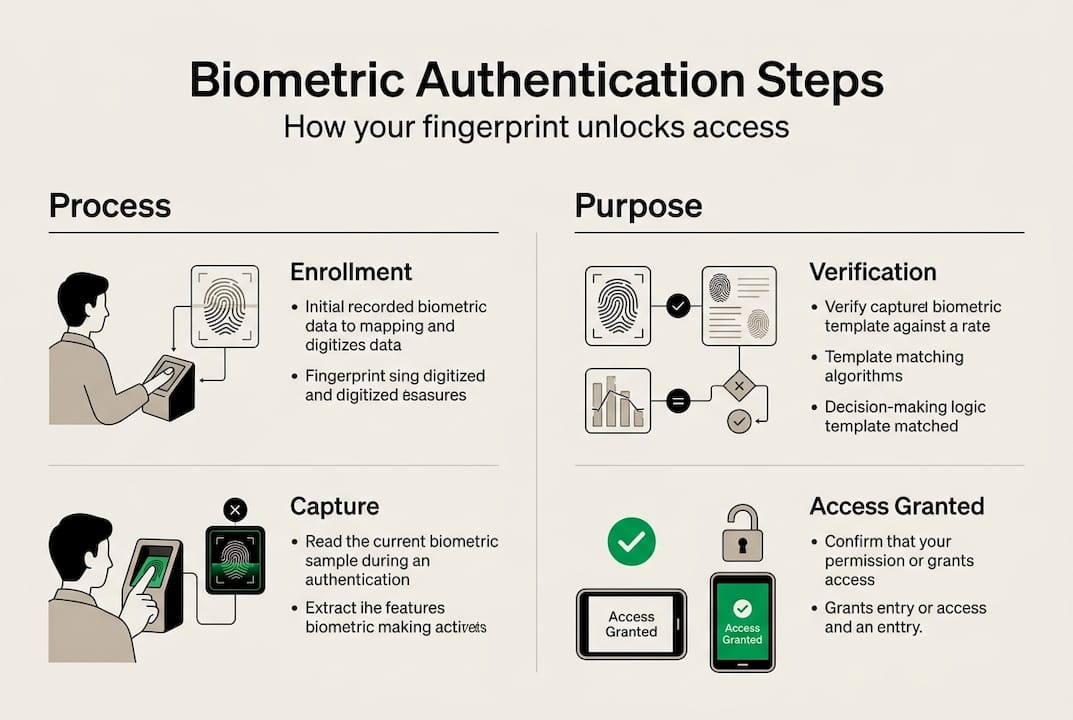
The fundamental process of biometric authentication involves five stages. The authentication process covers enrollment, feature extraction, template storage, matching, and a final access decision. Here’s how those stages map onto a real-world device:
| Stage | What happens | Why it matters |
|---|---|---|
| Enrollment | System captures your biometric data | Creates the reference point for all future scans |
| Feature extraction | Converts raw data into mathematical values | Strips identifiable images into abstract patterns |
| Template storage | Encrypted template saved on device or server | Protects the data from direct reconstruction |
| Matching | New scan compared to stored template | Determines identity in real time |
| Decision | Access granted or denied based on a score | Threshold controls sensitivity and error rate |
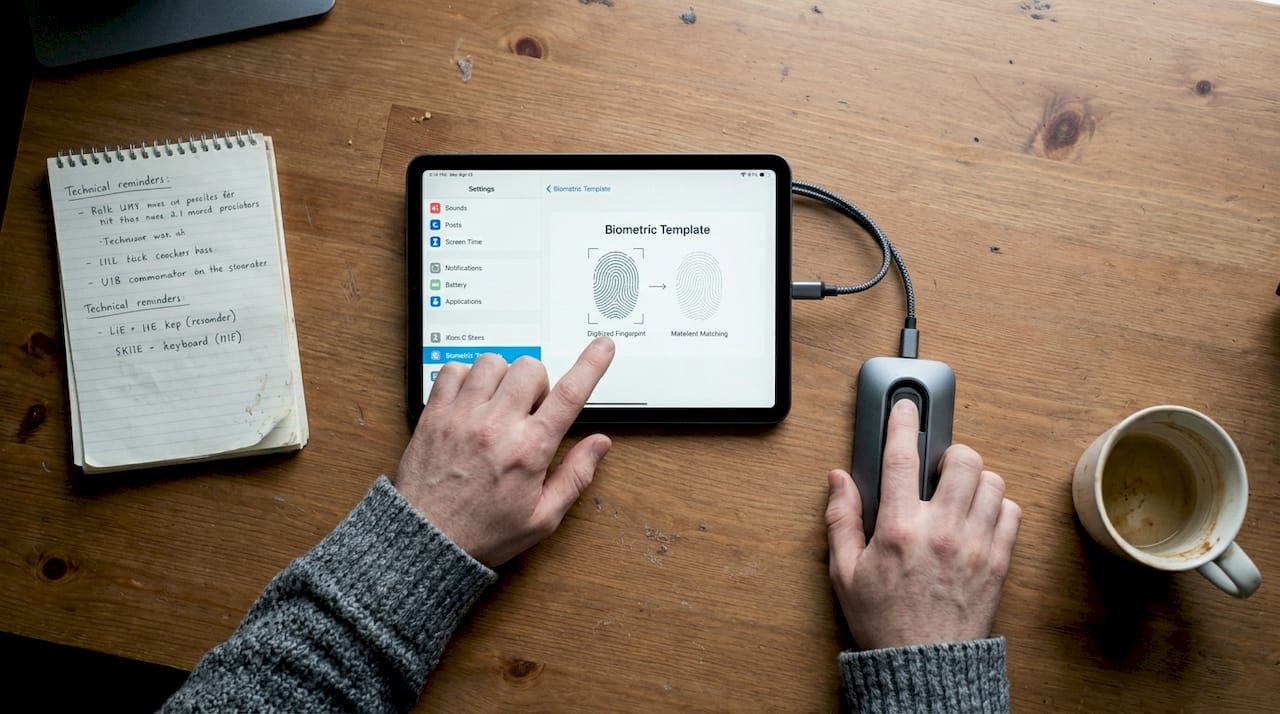
One important nuance: the system never stores your actual fingerprint photo. It stores a mathematical template derived from key features of that print. Even if someone accessed that file, reconstructing your real fingerprint from it is computationally impractical with modern encryption standards.
The mechanics of biometric authentication: A step-by-step guide
Now let’s get specific about what happens the moment you press your finger to a reader or glance at a camera. The authentication workflow captures data, extracts features, stores a protected template, and compares new scans to that reference in real time.
Here’s the full sequence, step by step:
- Enrollment: You present your biometric trait, often multiple times. The sensor captures high-resolution data to build a reliable baseline.
- Feature extraction: The processor identifies key points, called minutiae in fingerprinting, and converts them into a numeric string. The raw image is discarded.
- Template creation: That numeric string is encrypted and stored. On-device storage means the data never leaves the hardware.
- Live scan: Each time you request access, the sensor captures a new reading under real conditions: different lighting, slight finger angle variation, and so on.
- Matching algorithm: The new scan’s extracted features are compared mathematically to the stored template. No image-to-image comparison happens.
- Threshold decision: If the similarity score clears a preset threshold, access is granted. Set too low and impostors may pass. Set too high and legitimate users get rejected.
This threshold concept is central to understanding biometric performance. Two key metrics govern it: the False Acceptance Rate (FAR), which measures how often an impostor gets in, and the False Rejection Rate (FRR), which measures how often a legitimate user is locked out. Better systems let administrators tune these based on the security level required.
Pro Tip: Pair your biometric device with a PIN backup. If a sensor fails due to a cut finger or harsh lighting, you won’t be locked out of your own property. Multi-factor security basics explain exactly why layering methods like this produces stronger outcomes than any single method alone.
Benefits and risks: Is biometric security safer and more convenient?
Biometrics deliver measurable performance advantages. In head-to-head testing, biometrics outperform passwords significantly: authentication takes 1.8 seconds versus 6.2 seconds for passwords, accuracy reaches 97% versus 88%, and user satisfaction scores 8.9 out of 10 versus 6.4. Those aren’t minor improvements. For a busy business with dozens of employees accessing secure areas daily, the time savings alone justify attention.
| Metric | Biometric | Password |
|---|---|---|
| Authentication speed | 1.8 seconds | 6.2 seconds |
| Accuracy rate | 97% | 88% |
| User satisfaction | 8.9 / 10 | 6.4 / 10 |
But the risks are real and should not be glossed over. Biometrics are not infallible: errors occur due to environmental conditions, demographic factors, and spoofing attacks. Even advanced liveness detection can be bypassed by convincing deepfake media in certain test conditions.
“Biometric data is not secret and cannot be changed if leaked.” — NIST Digital Identity Guidelines
That quote captures the most serious asymmetry in biometric security. You can reset a compromised password in two minutes. You cannot replace your fingerprints. Ever. This irreversibility changes the risk calculus entirely.
Reviewing NIST benchmarks helps you identify vendors whose systems have been independently tested for accuracy and resistance to spoofing. Don’t skip this step when evaluating products.
Smart locks and security systems that incorporate liveness detection add a critical layer against photo and silicone fingerprint attacks. If you’re evaluating biometric hardware, liveness detection is a non-negotiable feature. You can also explore biometric authentication pros and cons specific to safes to see how these tradeoffs play out in real residential and commercial use cases.
Practical applications: Biometric security for property owners
With risks and perks in mind, here’s how you can use biometric security to fortify your own property. The good news is that the technology is no longer limited to corporate campuses or government facilities. Affordable, reliable options exist for both homeowners and small business owners.
Biometric systems are ideal for physical access points like entry doors and safes, particularly when paired with liveness detection, on-device processing, and multi-factor options. Here are the most practical applications by setting:
- Front doors: Facial recognition handles high-traffic entry without requiring anyone to pause and enter a code. Ideal for families with young children or businesses with shift workers.
- Interior rooms: Fingerprint readers work well for home offices, server rooms, or private storage areas where only select people need access.
- Gun safes and valuables storage: Fingerprint readers on biometric safes provide fast access under stress while keeping contents away from unauthorized users. Explore the advantages of biometric gun safes for a detailed look at why these are increasingly the default choice.
- Small business offices: Multi-door fingerprint systems can log access timestamps for accountability, giving you an audit trail that traditional keys never could.
The biometric system market is growing rapidly, driven by security needs, but implementation requires balancing cost, privacy, and vendor quality carefully. For homeowners, security solutions that integrate biometrics with existing alarm or camera systems offer the best value.
Pro Tip: Always choose a biometric system that stores templates on-device rather than in the cloud. If the vendor’s servers are breached, your data stays protected on your own hardware. Check out choosing a biometric gun safe for a practical buyer’s checklist you can apply to any biometric device.
Protecting your privacy: Biometric data storage and security for homeowners
Beyond performance, keeping your biometric data safe is critical. The data your lock or safe captures about you is permanent. If it’s leaked, you can’t rotate it like a password or reissue it like a key card. That permanence demands careful decisions about where that data lives and who controls it.
Home biometric systems should use encrypted template storage, avoid cloud repositories, and comply with established privacy best practices. Modern systems store only the mathematical template, not the raw fingerprint image or facial photo, which limits what an attacker could recover even in a worst-case breach.
Here’s what to prioritize when evaluating any biometric device for your home or business:
- On-device storage: The template never leaves the hardware. No network connection means no remote attack surface.
- AES-256 encryption: The gold standard for template encryption. Ask vendors specifically which encryption standard they use.
- No third-party data sharing: Read the privacy policy before purchase. Some consumer-grade devices share anonymized data with manufacturers.
- Regular firmware updates: Security vulnerabilities get patched through software. A device that no longer receives updates is a liability.
- Clear deletion protocols: You should be able to permanently remove all enrolled templates when you sell or replace the device.
Exploring smart home biometric systems that meet these criteria can also lower your home insurance premiums, since verified security upgrades are recognized by many insurers as meaningful risk reduction.
Why ‘secure enough’ isn’t enough: A hard truth on biometrics and layered security
Here’s the perspective that’s easy to miss when you’re excited about a new technology: biometric security is genuinely impressive, but calling it your security strategy is a mistake. No single authentication factor, biometrics included, is failproof. Always use multi-factor approaches.
We’ve seen homeowners install a fingerprint lock, feel invincible, and then skip camera coverage or leave a side window unmonitored. The biometric lock becomes the weakest point because it’s the only point. Real security thinking asks what happens after a motivated person bypasses the first barrier.
Layered security means combining biometrics with a PIN, a camera, an alarm, and physical reinforcement of the door frame itself. The goal isn’t to find one unbreakable solution. It’s to make the cost of intrusion high enough that your property isn’t worth targeting. Understanding why two-factor matters is the first step toward thinking like someone who’s genuinely protected rather than someone who just has impressive hardware.
Take the next step toward safer, smarter property access
You now understand how biometric systems work, what makes them powerful, and where they need support from other security measures. The next move is finding hardware that meets the privacy and performance standards this guide describes.
At Safes and Security Direct, we stock professional-grade biometric safes, smart locks, and integrated security systems built for real-world residential and commercial use. Every product comes with detailed specifications so you can match the right solution to your specific entry points, risk level, and budget. Browse our full range and reach out to our team for personalized guidance on building a layered security setup that doesn’t cut corners.
Frequently asked questions
What types of biometric security are best for home use?
Fingerprint and facial recognition systems are most effective for home entry, offering both speed and convenience when combined with a secondary method like a PIN or alarm system. Fingerprint and face recognition are consistently top-ranked for physical access control.
Can biometric systems be hacked or spoofed?
Biometric systems can sometimes be fooled by fake fingerprints, photos, or deepfakes, but modern systems use liveness detection to reduce these risks significantly. Deepfakes can bypass liveness in some test scenarios, which is why liveness checks are essential, not optional.
How is my biometric data stored and protected?
Your biometric data is converted into an encrypted digital template on the device itself, not stored as a photo or raw scan, and should never leave your property’s hardware. Modern systems store encrypted templates, not raw data, which limits exposure even if a device is physically stolen.
Is biometric security better than using a password?
Biometrics are faster and more accurate on their own, but combining them with another authentication method is safer than relying on either in isolation. Biometrics outperform passwords on speed and accuracy, but multi-factor authentication is the recognized best practice for robust protection.
Recommended
- Top Advantages of Biometric Gun Safes – Safes and Security Direct
- Troubleshoot Your Biometric Gun Safe Issues Easily – Safes and Security Direct
- Sports Afield Home Defense SA-HD1-BIO Biometric Vault – Safes and Security Direct
- Sports Afield Home Defense SA-HD2-BIO Biometric Vault – Safes and Security Direct
- Prevent break-ins: 83% burglar deterrence with smart locks