

Streamline your business surveillance workflow for security
TL;DR:
- Effective surveillance relies on well-designed workflows, not just hardware installation.
- Monitoring success depends on KPIs like detection speed and response times, not camera quantity.
- Integrating cybersecurity practices ensures footage and system security from potential digital threats.
Most businesses install cameras and assume the job is done. They’re not wrong to invest in hardware, but the real security gaps almost always live in the workflow, not the equipment. A poorly designed process means footage goes unreviewed, alerts get ignored, and incidents go undetected until the damage is already done. This guide walks you through every stage of building a business surveillance system workflow that actually works, from assessing your coverage needs and hardening your cyber posture to measuring performance with real KPIs. If you want surveillance that protects your assets and improves operational efficiency, the process matters as much as the product.
Table of Contents
- Assessing your security needs and workflow requirements
- Core components of an effective business surveillance workflow
- Integrating cybersecurity into your surveillance workflow
- Ongoing improvement: Metrics, benchmarks, and workflow validation
- Why businesses get surveillance workflow wrong—and how to get it right
- Upgrade your business security with expert guidance
- Frequently asked questions
Key Takeaways
| Point | Details |
|---|---|
| Design for workflow, not camera count | Effective business surveillance focuses on security outcomes and coverage, not just how many cameras you install. |
| Integrate cybersecurity best practices | Safeguard sensitive video data and operations by embedding identity protection, network controls, and benchmarks. |
| Measure what matters | Track KPIs like mean time to detect and respond for real improvement and accountability. |
| Continuously improve | Regular workflow assessment, training, and updates keep your business security resilient and efficient. |
Assessing your security needs and workflow requirements
Before you purchase a single camera or sign a contract with a monitoring provider, you need to define what success looks like. Too many businesses skip this step and end up with a patchwork of equipment that covers the wrong areas, generates too many false alerts, or fails to meet regulatory requirements.
Start by listing your outcome goals. Are you focused on asset protection, employee safety, regulatory compliance, or operational monitoring? Each goal shapes which cameras you need, where they go, and how footage is stored and accessed. A retail store protecting merchandise has very different requirements than a warehouse managing shift productivity or a medical office handling HIPAA-sensitive areas.
Next, map your physical vulnerabilities. Walk the property and identify:
- Entry and exit points (doors, loading docks, parking areas)
- High-value asset zones (server rooms, cash registers, storage areas)
- Low-visibility blind spots that create risk
- Areas with regulatory requirements (employee break rooms, customer-facing spaces)
- Locations where operational monitoring adds efficiency value
Once you have your map, list your technical requirements. Will you use cloud-based storage, on-premise servers, or a hybrid setup? Do you need integration with access control, alarm systems, or HR software? How many cameras do you actually need to cover your defined zones?
Here’s where most businesses make a critical mistake. Measuring by camera count is nearly meaningless compared to coverage and question-answering capability. A facility with 40 cameras pointed at the wrong angles is less secure than one with 15 cameras placed strategically with clear sight lines and integrated alerting.
Use this comparison to frame your planning:
| Approach | Focus | Outcome |
|---|---|---|
| Camera-count driven | Number of units installed | False sense of security, gaps in coverage |
| Workflow-driven | Coverage, access, and response | Measurable risk reduction and efficiency |
| Compliance-driven | Regulatory checkboxes | Meets minimum standards, may miss operational needs |
| Outcome-driven | Defined security goals | Aligned investment and real-world protection |
For guidance on securing commercial premises from the ground up, or tips on optimizing CCTV installation for your specific layout, those resources will help you move from planning to execution with confidence.
Core components of an effective business surveillance workflow
Once you clarify what you need, the next step is to understand how a secure surveillance workflow operates in practice. Think of it as a chain. Every link matters, and a break anywhere in the chain means your system cannot perform when it counts.
Here is the core workflow sequence every business should follow:
- Assessment and planning — Define goals, map vulnerabilities, and set measurable objectives before any equipment is selected.
- System selection — Choose cameras, storage, and software based on your defined requirements, not vendor recommendations alone.
- Configuration and hardening — Set up devices securely: change default credentials, disable unused ports, apply firmware updates, and segment your network.
- Live monitoring — Establish who watches what, when, and how. Define shift responsibilities and escalation paths.
- Alerting and intervention — Configure automated alerts for motion, access violations, or unusual activity. Define the response protocol for each alert type.
- Review and audit — Schedule regular footage reviews, system health checks, and access log audits.
- Incident response — Maintain a clear chain of custody for evidence, and document every incident with timestamps and footage references.
Automation plays a major role in modern workflows. Motion-triggered alerts, AI-based anomaly detection, and remote access dashboards mean your team can respond faster without needing eyes on every screen at all times. Security system must-haves for 2026 increasingly include these automated layers as standard.
Best practice workflow involves secure identity management, network segmentation, and cloud security controls at every stage. This means user accounts with role-based permissions, not shared logins. It means your surveillance network is isolated from your general business network. And it means your team knows exactly what to do when an alert fires.

Pro Tip: Document your workflow in a simple one-page visual map. When an incident happens, staff should not need to think about what to do next. The process should be automatic.
For businesses managing multiple locations or remote sites, office surveillance solutions that support centralized management dashboards are worth prioritizing.
Integrating cybersecurity into your surveillance workflow
Security is never set it and forget it. Embedding cyber best practices into your surveillance workflow protects your entire investment and keeps sensitive footage out of the wrong hands.
Many business owners treat surveillance cameras as simple hardware. They are not. Every IP camera, cloud storage account, and remote access portal is an entry point for attackers. Surveillance video is sensitive data and requires hardening, identity protection, network segmentation, and encryption to stay secure.
Here is how cyber measures map to each stage of your workflow:
| Workflow stage | Key cyber measure | Why it matters |
|---|---|---|
| Deployment | Change default credentials, apply firmware updates | Eliminates the easiest attack vectors |
| Live monitoring | MFA on all access accounts, role-based permissions | Prevents unauthorized viewing or tampering |
| Data storage | Encrypted storage (at rest and in transit) | Protects footage from interception or theft |
| Remote access | VPN or zero-trust network access | Secures connections from off-site staff |
| Incident retrieval | Chain-of-custody logging, audit trails | Preserves evidence integrity for legal use |
Identity security is your first line of defense. Every user who can access your surveillance system should have a unique login with multi-factor authentication (MFA) enabled. Role-based access control (RBAC) means your front desk manager can view lobby cameras but cannot delete footage or access server room feeds.
Network segmentation is equally critical. Place your surveillance devices on a dedicated VLAN (virtual local area network) that is isolated from your business operations network. This limits the blast radius if any device is compromised.
“Treat your surveillance infrastructure with the same rigor you apply to financial or HR systems. The footage it captures is just as sensitive and just as valuable to bad actors.”
Pro Tip: Use published cloud security benchmarks, such as the CIS Controls or NIST frameworks, to audit your setup quarterly. They give you a structured checklist rather than guesswork.
For guidance on strategic camera setup that accounts for both physical and cyber risk, and for features to look for in live camera remote access tools, those resources will sharpen your implementation.
Ongoing improvement: Metrics, benchmarks, and workflow validation
No workflow is ever finished. Ongoing improvement is the key to sustained protection and efficiency, and it starts with measuring the right things.
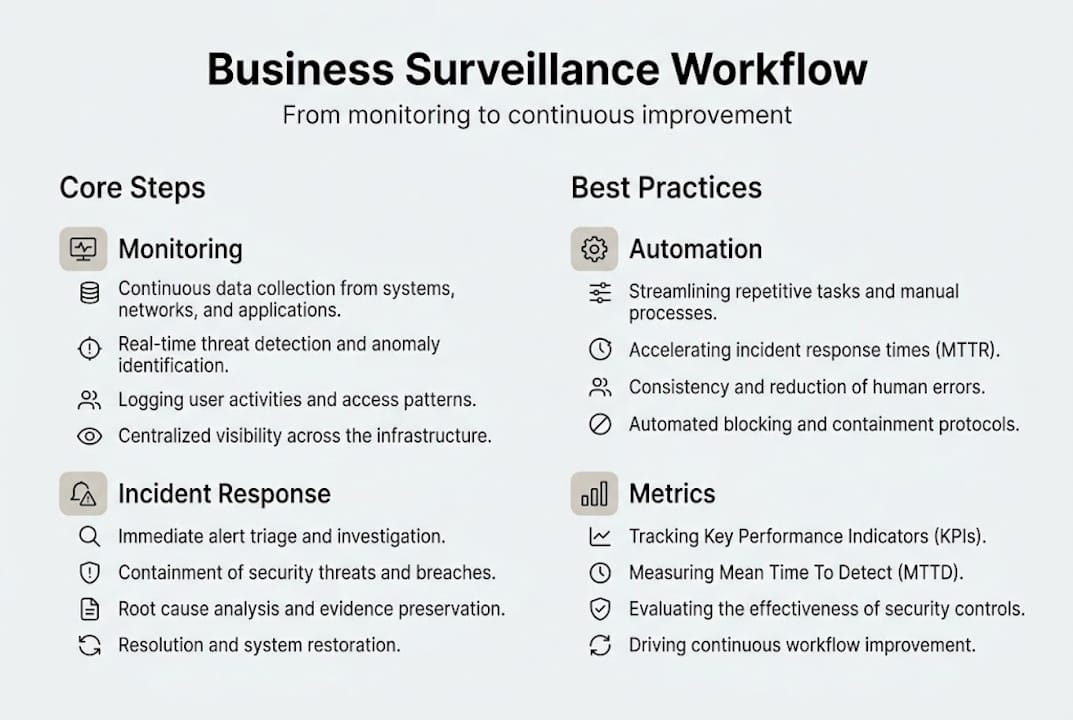
Most businesses measure surveillance success by asking: “Do the cameras work?” That is the wrong question. The right questions are: How fast do we detect an incident? How fast do we respond? How often do we get false alerts that waste time? These are the metrics that reveal whether your workflow is actually performing.
Here are the top KPIs every business should track:
- Coverage rate — What percentage of your defined risk zones have active, functioning camera coverage?
- Mean time to detect (MTTD) — How long does it take from an incident occurring to your team becoming aware of it?
- Mean time to respond (MTTR) — How long from detection to active intervention?
- Mean time to contain (MTTC) — How long until the incident is fully resolved and documented?
- False positive rate — How often do automated alerts fire for non-events? High rates cause alert fatigue and missed real incidents.
- False negative rate — How often does a real incident go undetected by your alerting system?
Benchmarking KPIs like mean time to detect, respond, and contain is essential for real insight and operational improvement. Without these numbers, you are guessing.
Once you have baseline metrics, establish targets and run validation exercises. A tabletop exercise simulates a security incident on paper and tests whether your team follows the workflow correctly. A live drill tests the technical systems: Does the alert fire? Does the right person receive it? Can they access footage remotely within the required timeframe?
Schedule these validations quarterly. Document the results and track improvement over time. Assign a workflow owner, whether that is your operations manager, IT lead, or an external security consultant, who is accountable for the numbers.
Stat callout: Businesses that increase camera counts without reforming their workflow see less than 50% of the efficiency gains compared to those who invest in process improvement alongside hardware upgrades.
For a deeper look at measuring security system KPIs and understanding security metrics explained in plain language, those resources will help you build a reporting framework that actually means something.
Why businesses get surveillance workflow wrong—and how to get it right
Here is what most guides miss: businesses consistently over-invest in hardware and under-invest in the process that makes hardware useful. We see it constantly. A property manager installs a top-tier camera system, then has no documented response protocol, no KPI tracking, and shared login credentials across the entire team. The cameras are excellent. The workflow is broken.
Expensive gear delivers almost no value without a process for detection, response, and review. The real advantage comes from measurable, adaptive workflows, not the latest technology for its own sake. A mid-range camera system with a well-designed workflow will outperform a premium system with no process every single time.
The businesses that get this right invest in three things beyond the hardware: workflow documentation, ongoing metrics, and continuous staff training. They treat surveillance as a living system, not a one-time installation. Improving commercial security solutions is not about buying more. It is about using what you have more intelligently, measuring the results, and adjusting.
Upgrade your business security with expert guidance
If this guide has shown you anything, it is that a strong surveillance workflow requires the right products and the right process working together. At Safes and Security Direct, we specialize in helping businesses like yours build surveillance systems that perform in the real world, not just on paper.

Whether you need help selecting the right cameras for your coverage requirements, hardening your existing setup, or building a workflow from scratch, our team has the expertise to guide you. Explore our full range of professional-grade surveillance solutions, or check out our home security workflow guide if you manage hybrid or residential properties. The right setup is closer than you think.
Frequently asked questions
What is a business surveillance system workflow?
A business surveillance system workflow is the end-to-end process covering how surveillance data is captured, secured, monitored, and acted upon. Cloud security best practices confirm this includes everything from initial capture through incident response and evidence management.
How do I measure the effectiveness of my business surveillance setup?
Skip the camera count and benchmark KPIs like mean time to detect, respond, and contain security incidents instead. These metrics give you real insight into whether your workflow is performing.
Is cloud-based surveillance secure for sensitive business data?
Yes, provided you implement identity hardening with MFA, network segmentation, and encrypted storage. Following cloud security benchmarks like CIS Controls gives you a structured framework for maintaining that security over time.
What’s the most common mistake businesses make with surveillance systems?
Focusing on camera count over workflow is the most common and costly mistake. Without a documented process for detection, response, and review, even the best hardware fails to deliver real security.
Recommended
- Essential Guide to Security Surveillance Camera Systems for Beginners – Safes and Security Direct
- Optimize Business Security with CCTV Installation – Safes and Security Direct
- Home security setup workflow for maximum protection – Safes and Security Direct
- Strategic Security Camera Setup for Optimal Protection – Safes and Security Direct
- Cybersecurity Leadership Workflow for Compliance Success
- Workflow sécurité au travail : guide complet PME et ETI