

Surveillance cameras: what they really do for your security
TL;DR:
- Cameras primarily serve deterrence, monitoring, and evidence collection functions with limited impact on crime reduction.
- Smart cameras offer AI-powered analytics but require careful setup to avoid false alarms and manage privacy risks.
- Legal and ethical considerations include respecting privacy expectations and complying with audio recording laws and local regulations.
Most property owners assume that putting up cameras is enough to stop crime. That assumption is understandable but incomplete. CCTV effectiveness isn’t universal, and results depend strongly on context, placement, and how the system is managed. This guide cuts through the marketing hype to explain what surveillance cameras genuinely contribute to security, what technology advances actually deliver, where the legal landmines are, and what practical steps give you real protection rather than just a false sense of it.
Table of Contents
- What do surveillance cameras actually do?
- How smart technology is changing surveillance
- Privacy and legal pitfalls for home and business surveillance
- Best practices for effective and ethical surveillance
- What most buyers miss about surveillance cameras
- How to get started with trusted camera solutions
- Frequently asked questions
Key Takeaways
| Point | Details |
|---|---|
| Effectiveness varies | Surveillance cameras can help deter crime or improve feelings of safety, but impact depends on placement and context. |
| Smart tech adds value—and complexity | Features like AI alerting and remote viewing boost usefulness but can also create new problems if not well managed. |
| Privacy laws matter | Legal compliance is critical; always check local rules, especially regarding audio and where cameras point. |
| Best practices build trust | Use privacy-first setup, clear notification, and regular audits for effective and ethical surveillance. |
| No single solution | Cameras are most effective when integrated with lighting, signage, and other security layers. |
What do surveillance cameras actually do?
Cameras serve three core functions: deterrence, monitoring, and evidence collection. Most buyers focus on deterrence, imagining that a visible camera stops a criminal before they act. That’s sometimes true, but it’s far from guaranteed. Opportunistic offenders may notice a camera and move on. Determined or impulsive ones often don’t.
Monitoring is the second function, and it’s only valuable if someone is actively watching the feed in real time. For most homes and small businesses, nobody is. Evidence collection is the third function, and it’s often the most consistently useful one. Recorded footage helps police identify suspects, supports insurance claims, and can resolve disputes between employees, tenants, or customers.
Understanding how cameras deter theft requires recognizing that deterrence is psychological. A camera only deters someone who notices it, believes it’s recording, and decides that the risk outweighs the reward. That’s a chain of assumptions that doesn’t always hold.
CCTV can reduce crime or the fear of crime in some hot spots, but the impact is often limited and context-dependent. Parking lots, for example, show stronger deterrence effects than open public areas.
“Camera coverage alone does not guarantee crime reduction. The environment, camera visibility, response protocols, and public awareness all shape outcomes.”
What cameras typically do well:
- Capture evidence after an incident occurs
- Create a documented record for insurance and legal use
- Reinforce other security measures like lighting and access control
- Provide remote check-ins for property owners who travel
What cameras often can’t do on their own:
- Guarantee real-time intervention during an incident
- Eliminate crime in areas without active monitoring
- Replace physical barriers like locks, fencing, or alarm systems
Research on fear of crime studies shows that cameras sometimes reduce anxiety in residents even when they don’t reduce actual crime rates. That psychological effect has value, but it shouldn’t be confused with a genuine security upgrade.
| Outcome | Evidence strength | Notes |
|---|---|---|
| Theft deterrence | Moderate | Stronger in enclosed spaces like parking lots |
| Fear reduction | Weak to moderate | Varies by individual and location |
| Evidence for prosecution | Strong | Consistently cited as the clearest benefit |
| Real-time crime stopping | Weak | Only useful with active monitoring in place |
| Displacement of crime | Moderate | Offenders sometimes move to unmonitored areas |
If you’re new to building a camera system, the camera systems beginner guide covers the basics of hardware choices, resolution, and storage without overwhelming technical jargon.
How smart technology is changing surveillance
Traditional cameras record continuously and require someone to review footage manually after an incident. Smart cameras change that model. They use AI-powered analytics to detect motion, identify faces or license plates, and push real-time alerts to your phone. Some can distinguish between a person, a vehicle, and an animal, cutting down on irrelevant notifications.
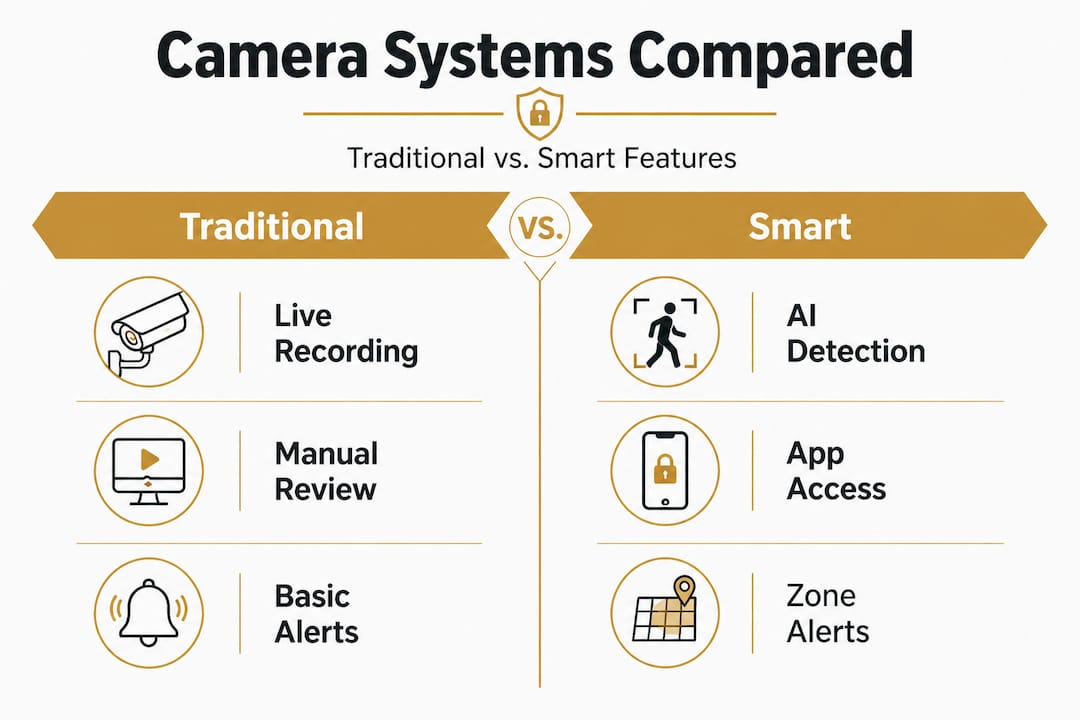
This is genuinely useful technology. But it comes with a tradeoff. Smart camera AI features can help, but they may also create extra work if false positives become excessive. A camera that alerts you forty times a day for blowing leaves or passing cars trains you to ignore alerts, which defeats the purpose.
| Feature | Traditional camera | Smart camera |
|---|---|---|
| Motion alerts | Basic or none | AI-filtered, zone-based |
| Remote access | Limited | Full smartphone integration |
| Face recognition | No | Often available |
| Storage | Local only | Cloud or hybrid |
| False alarm rate | N/A | High without proper setup |
| Cost | Lower upfront | Higher, plus subscription |
| Privacy risk | Lower | Higher due to cloud data |
The comparison above shows that smart cameras add capability but also add complexity and potential exposure. Before upgrading, honestly assess whether you have the time and setup to manage alerts responsibly.
Here’s how to reduce alert fatigue and make smart cameras actually useful:
- Set specific alert zones. Draw detection boundaries around entry points like doors, gates, and driveways rather than letting the camera monitor an entire wide-angle view.
- Adjust sensitivity settings. Most smart cameras let you set motion sensitivity levels. Start at medium and dial down if you’re getting too many false triggers.
- Use object filtering. Enable human-only or vehicle-only detection if your camera supports it. This eliminates most pet and environmental false alarms.
- Schedule active hours. If your property is occupied during certain hours, disable or reduce alerts for that window so you only get notified when something unexpected happens.
- Review and refine monthly. Pull your alert log once a month and identify recurring false alarm sources, then adjust zones or filters accordingly.
Minimizing false alarms is one of the highest-impact improvements you can make to any camera system, because a system you trust is a system you actually use.
Pro Tip: Always pair motion-triggered cameras with motion-sensing flood lights. Lighting both improves footage quality at night and independently deters intruders, so you get two security layers from one trigger.
Privacy and legal pitfalls for home and business surveillance
This is where many owners run into serious problems. Installing cameras feels intuitive, but the legal landscape is fragmented and often surprising. Legality depends heavily on camera placement, what’s recorded, and especially audio. No single federal law covers everything, which means state and local rules create a patchwork that can catch you off guard.
The key legal concept is “reasonable expectation of privacy.” People in public spaces generally have a lower expectation of privacy. But your neighbor’s backyard, a bathroom, a locker room, or even a private office where employees change or conduct personal conversations carries a much higher expectation. Pointing a camera at any of those spaces, even accidentally, can expose you to civil or criminal liability.
Situations that commonly create legal problems:
- Cameras that inadvertently capture a neighbor’s private outdoor areas
- Footage that records audio without consent in a two-party consent state
- Cameras placed in restrooms, changing rooms, or sleeping areas
- Workplace cameras in areas where employees have a legal expectation of privacy
- Using footage for purposes beyond security, such as monitoring an ex-partner
Audio recording is where things get particularly strict. Video recording with no audio in a visible, non-private area is usually legal. Add a microphone, and suddenly you may be subject to wiretapping laws. Roughly a dozen U.S. states require all parties in a conversation to consent before it’s recorded. If your camera picks up audio in California, Florida, Pennsylvania, or several other states without consent, you could face criminal charges, not just a civil complaint.
Pro Tip: Before you mount a single camera, check your state’s specific laws at your state attorney general’s website, and consult a local attorney if you’re installing systems in commercial spaces with employees. Learn the camera privacy laws that apply specifically to residential settings so you know exactly where your boundaries are.
Privacy compliance basics:
- Post visible signage notifying people that recording is in progress, especially in commercial spaces
- Avoid recording areas where people have a strong expectation of privacy
- Disable audio recording unless you’ve confirmed it’s legal and all parties are notified
- Store footage securely and limit who in your organization can access it
- Set retention periods so footage is automatically deleted after a set number of days
Review the most common installation mistakes to avoid before your system goes live. Many of the most serious errors happen at installation and are difficult to fix later.
Best practices for effective and ethical surveillance
Knowing what cameras can and can’t do, and knowing where the legal lines sit, positions you to build a system that actually works. The goal isn’t just avoiding trouble. It’s designing a setup that earns trust from the people inside your property while protecting everyone from external threats.
Privacy-first design favors data minimization, on-premise storage, and strict access control. That means recording only what you need, keeping footage on a local server or NVR rather than a cloud service you don’t control, and logging who views or exports footage.
Practical steps for ethical and effective camera deployment:
- Use cameras with narrow fields of view where precision matters more than coverage, such as near a safe, server room, or cash register
- Favor local storage over cloud subscriptions to reduce exposure to data breaches and third-party access
- Post clear signage at entry points in commercial properties so visitors and employees know recording is in effect
- Limit access credentials so only designated personnel can view live feeds or archived footage
- Combine cameras with lighting and signage to create layered deterrence rather than relying on any single measure
- Position cameras to capture entry points, not interior personal spaces, especially in homes where family members deserve their own privacy
Optimal camera placement is one of the biggest factors in real-world effectiveness. A well-placed camera with average resolution will outperform a high-resolution camera pointed in the wrong direction.
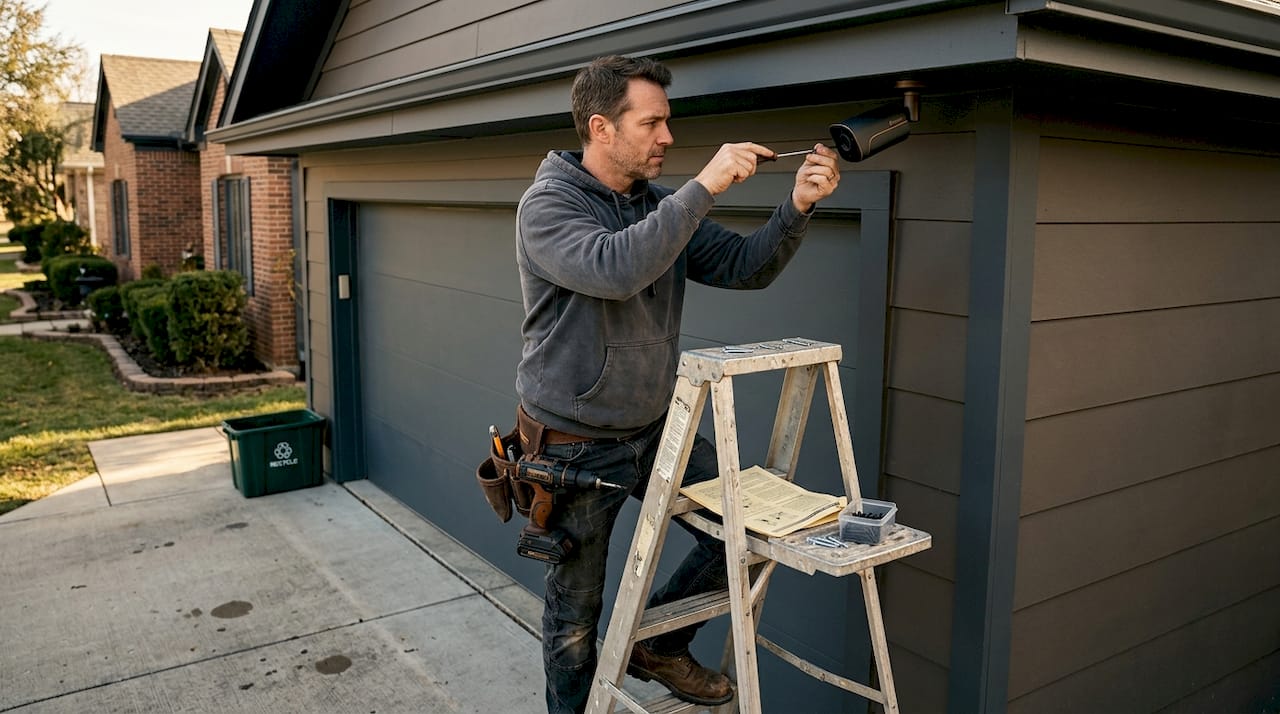
Think carefully about camera types before purchasing. Dome cameras discourage tampering because it’s harder to tell where they’re pointing. Bullet cameras are more visible and carry stronger deterrence value. PTZ cameras offer remote pan, tilt, and zoom for large spaces but require active operators to be useful.
Pairing cameras with quality security lighting improves footage quality and adds a secondary deterrence layer that works even when a camera isn’t actively monitored.
Pro Tip: Schedule a quarterly audit of your camera system. Check that every camera is still correctly aimed, test that storage and backup systems are working, and review access logs to confirm that footage is only being viewed by authorized people.
What most buyers miss about surveillance cameras
Here’s the uncomfortable truth that most security marketing glosses over: cameras are tools, not solutions. They extend your awareness and help you respond after the fact, but they don’t make your property safe on their own.
Conventional wisdom overstates crime reduction from cameras. Most measured benefits come from strategic deployment, active response protocols, and responsible governance of the system, not from the hardware itself. A camera that nobody monitors, in a location that isn’t assessed for risk, pointed at an area that doesn’t need coverage, contributes almost nothing to security.
What we see repeatedly is that buyers invest in expensive smart cameras but skip the fundamentals: good locks, motion lighting, alarm systems, and clear protocols for what to do when something is detected. The camera becomes a psychological comfort rather than a functional layer of protection. That’s a real problem, because false confidence can lead you to under-invest in measures that actually work.
The other thing most buyers miss is that community context matters enormously. Cameras work better in smaller, well-monitored spaces than in large, anonymous areas. A camera in your business entrance, watched by a trained employee, is far more effective than the same camera in an unstaffed parking lot. Design your system around your specific environment and the realistic threats you face, not around generic advice.
Read through DIY surveillance tips for a grounded starting point if you’re building or upgrading your system yourself. The goal is always a system you’ll actually maintain and trust, not the most feature-packed one on the shelf.
Privacy is not an afterthought. Owners who treat privacy as a compliance box to check tend to create systems that erode trust with employees, tenants, and family members. Owners who design with privacy in mind from the start build systems that are more accepted, more effectively used, and less likely to create legal or ethical headaches down the road.
How to get started with trusted camera solutions
If these insights have helped you think more clearly about what you actually need from a surveillance system, you’re ready to make a smarter purchasing decision.
At Safes and Security Direct, we carry professional-grade surveillance cameras designed for real-world home and business security needs, not just impressive spec sheets. Whether you’re building a system from scratch or upgrading an existing setup, our product range covers everything from basic entry-level cameras to AI-enabled smart systems with local storage options. Use our detailed security camera setup guide to map your coverage needs before you buy, and browse our catalog with confidence knowing every product is selected for durability, reliability, and real security performance.
Frequently asked questions
Do security cameras really prevent theft?
Research shows cameras can deter theft in some contexts, particularly enclosed, well-monitored spaces, but results are inconsistent and heavily dependent on placement and whether active monitoring is in place.
Is it legal to install cameras with audio in my home or business?
Audio recording is governed by strict wiretap laws that go beyond basic video surveillance rules, and in many U.S. states you must have consent from all parties before recording conversations.
How do I limit privacy risks with my surveillance cameras?
Privacy-first design favors local storage, limiting camera fields of view to relevant areas only, and restricting access to footage to designated, authorized individuals.
Can AI and smart features make cameras more effective?
AI features genuinely expand camera capabilities, but false positives in AI detection systems can create alert fatigue, making proper zone configuration and sensitivity tuning essential before you rely on them.
Do security cameras reduce the fear of crime?
The evidence is mixed. Fear of crime outcomes vary significantly between individuals and locations, and camera presence doesn’t consistently translate into reduced anxiety for all residents or occupants.
Recommended
- How security cameras deter theft and protect your property – Safes and Security Direct
- Essential Guide to Security Surveillance Camera Systems for Beginners – Safes and Security Direct
- Cameras Deterring Burglary: Effective Security Insight – Safes and Security Direct
- Office Building Video Surveillance: Enhance Security & Efficiency – Safes and Security Direct
- Thuissurveillance betekenis: slimme huisbeveiliging uitgelegd
- Avantajele esențiale ale supravegherii poligon pentru CCTV