

Security Camera Buying Guide for Home and Business
TL;DR:
- Choosing the right security camera involves selecting features that match your property’s needs, focusing on power source, storage, AI capability, and installation. Wired cameras offer reliability for permanent setups, while wireless and battery options suit rentals and temporary installations; local storage reduces costs, and AI features enhance detection accuracy. Prioritize privacy, smart home compatibility, and outdoor ratings to ensure a secure, integrated, and cost-effective surveillance system.
Choosing the right security camera means matching specific features to your property’s actual needs, not buying the most expensive model on the shelf. Brands like Eufy, Reolink, and Nest offer cameras across every price point, but the real decision comes down to five factors: power source, storage method, AI capabilities, resolution, and installation complexity. This guide to choosing a security camera walks you through each factor so you spend money on protection that works, not on features you will never use.
What types of security cameras should you consider?
The types of security cameras available today fall into three main categories: wired, wireless, and battery or solar powered. Each serves a different situation, and picking the wrong type creates problems that no amount of software can fix.
Wired cameras (PoE/IP systems) connect directly to a router or network video recorder via an Ethernet cable. PoE systems avoid signal interference and battery management issues common to wireless cameras. That makes them the right call for permanent installations in homes or commercial buildings where reliability is non-negotiable.
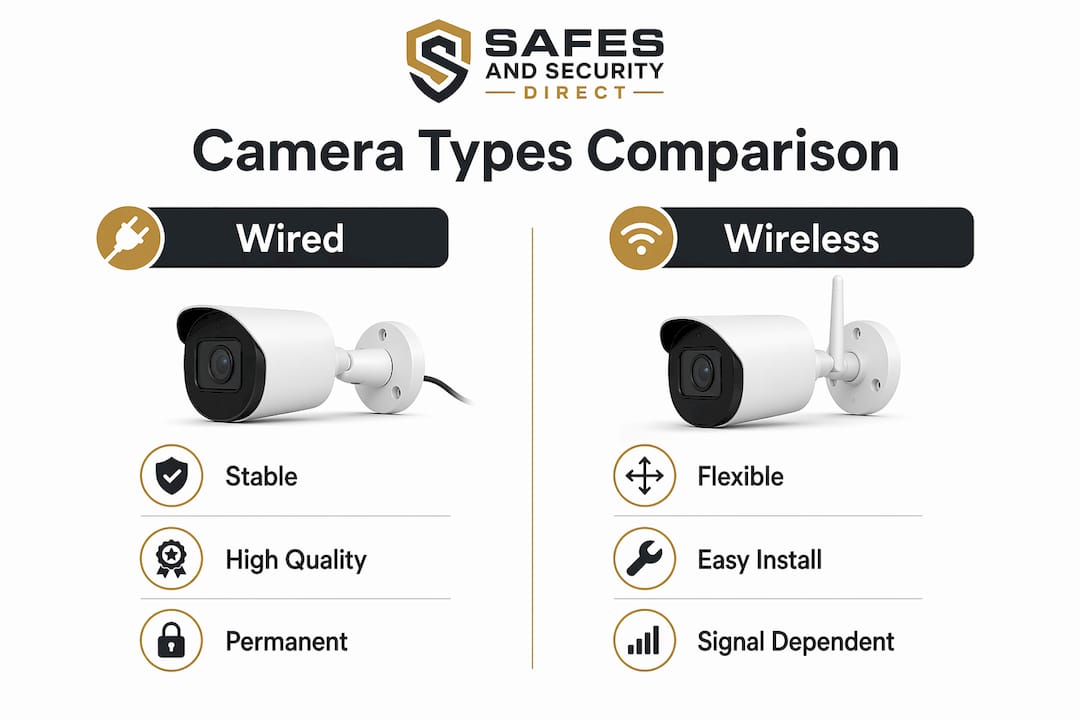
Wireless cameras connect over Wi-Fi and are far easier to install. The trade-off is signal dependency. Thick walls, long distances from the router, and network congestion all degrade performance. For most homeowners with a solid Wi-Fi setup, wireless cameras from brands like Reolink or Eufy work well in indoor and covered outdoor locations.
Battery and solar-powered cameras are the best fit for renters, temporary setups, or locations where running cable is impractical. Solar models from brands like Ring and Reolink eliminate the need to recharge manually, but they depend on consistent sunlight. In shaded or northern climates, battery life drops faster than the marketing materials suggest.
| Camera Type | Best For | Key Trade-off |
|---|---|---|
| Wired PoE | Permanent home or business installs | Requires cable runs and professional setup |
| Wireless Wi-Fi | Renters, easy DIY installs | Signal dependent, potential interference |
| Battery/Solar | Remote spots, no cable access | Limited recording time, sunlight dependent |
- Wired cameras deliver the most stable, long-term performance
- Wireless cameras offer flexibility but require a strong Wi-Fi network
- Battery cameras suit temporary or rental situations
- Solar cameras work best in high-sunlight regions
Pro Tip: If you own your property and plan to keep cameras for more than three years, invest in a wired PoE system. The upfront installation cost pays off in reliability and zero battery management.
How do you select the right video quality and AI features?
Resolution is the first spec most buyers look at, but it is rarely the most important one. On-camera AI analytics reduce false alarms more effectively than higher resolution, providing greater operational value for both homeowners and business operators.

4K resolution increases bandwidth and storage exponentially compared to 1080p. That means larger hard drives, faster network equipment, and higher costs across the board. For most residential and small business applications, 2MP (1080p) captures enough detail to identify faces and license plates at close range. Reserve 4K for specific scenarios like wide parking lots or retail floors where you need to zoom in on distant subjects without losing clarity.
AI features are where modern cameras genuinely earn their price. The capabilities that matter most include:
- Human and vehicle detection: Filters out animals and moving branches to cut false alerts
- Line crossing detection: Triggers an alert only when someone crosses a defined boundary
- Loitering detection: Flags anyone who stays in a zone longer than a set time
- Object classification: Distinguishes between a person, car, and package without cloud processing
On-device AI features like line crossing and loitering detection run directly on the camera’s processor. That means faster alerts, no subscription required, and no footage leaving your network for analysis. Cameras from Reolink and Hikvision both offer on-device AI at mid-range price points.
Pro Tip: Before buying, ask specifically whether the AI runs on the camera itself or in the cloud. Cloud-based AI almost always requires a monthly subscription to stay active.
Does power source and storage method affect long-term costs?
Power and storage decisions have the biggest impact on what you pay after the initial purchase. Getting these two choices right from the start avoids what one industry guide calls recurring “digital rent” costs from cloud subscriptions.
Here is how to think through each option:
- Choose wired power where possible. PoE cameras draw power and transmit data over a single Ethernet cable. There are no batteries to replace and no Wi-Fi dropouts to manage.
- Use local storage as your primary method. A microSD card or a network video recorder (NVR) stores footage on-site. Local storage provides 24/7 recording even during Wi-Fi outages, which cloud storage cannot guarantee.
- Treat cloud storage as a backup, not a primary solution. Cloud plans from providers like Nest Aware or Ring Protect typically cost $5–$15 per month per camera. Across a four-camera system over three years, that adds up to $720–$2,160 in subscription fees alone.
- For battery cameras, calculate realistic recharge cycles. Most battery cameras last 1–3 months per charge under normal motion activity. High-traffic areas drain batteries in weeks.
| Storage Method | Monthly Cost | Works During Outage | Privacy Level |
|---|---|---|---|
| Cloud (Nest Aware, Ring Protect) | $5–$15 per camera | No | Lower (off-site servers) |
| MicroSD (on-camera) | $0 | Yes | High (on-site) |
| NVR/DVR (local network) | $0 | Yes | High (on-site) |
Combining local storage with on-device AI is the single most effective way to reduce false alerts and eliminate subscription fees simultaneously. That combination should be your baseline requirement when evaluating any system.
Where and how should you install security cameras?
Camera placement determines whether your system actually catches incidents or just records empty corners. Strategic placement is a skill, and most buyers underestimate how much it matters. Reviewing common installation mistakes before you mount anything saves significant time and money.
For outdoor cameras, weatherproofing ratings are non-negotiable. IP65 resists dust and water jets; IP67 protects against heavy rain and temporary immersion. Use IP65 for covered eaves and porches. Use IP67 or higher for fully exposed walls, fences, and rooflines in wet climates.
Placement principles that actually work:
- Cover all entry points first: front door, back door, garage, and ground-floor windows
- Position cameras at 8–10 feet high to capture faces without being easily tampered with
- Avoid pointing cameras directly at bright light sources, which wash out the image
- Use overlapping fields of view at corners so there are no blind spots between cameras
- For businesses, cover cash registers, server rooms, and loading docks as priority zones
Pro Tip: Walk your property at night before finalizing camera positions. Lighting conditions after dark reveal blind spots that daylight walkthroughs miss entirely.
Temperature range matters as much as IP rating. Cameras rated for 14°F to 122°F (minus 10°C to 50°C) handle most North American climates. Check the spec sheet before buying for any outdoor location that experiences freezing winters or extreme summer heat.
How do privacy settings and smart home compatibility affect your choice?
Privacy should be treated as a core feature, not an afterthought. Cameras that store footage on overseas servers without encryption expose your home or business footage to risks that no resolution upgrade can fix.
The minimum privacy requirements for any camera you buy in 2026:
- End-to-end encryption (E2EE): Footage is encrypted from camera to viewer, with no readable data in transit
- Two-factor authentication (2FA): Prevents unauthorized account access even if your password is compromised
- Transparent server location policy: Know exactly where your footage is stored and under which country’s data laws
Cameras storing footage overseas without encryption expose users to real risk. Brands like Eufy faced scrutiny in 2023 for transmitting thumbnail images to cloud servers without user consent. That incident is a reminder to read privacy policies, not just spec sheets.
Smart home compatibility is the second major consideration. Incompatible devices require multiple separate apps, which limits functionality and creates a frustrating daily experience. Before purchasing, confirm the camera works natively with your existing ecosystem.
- Google Home: Works with cameras from Nest, Reolink, and several Eufy models
- Apple HomeKit: Supported by Logitech Circle View, Eufy, and select Arlo models
- Amazon Alexa: Compatible with Ring, Blink, and most major brands
Lack of smart home compatibility is the most common cause of buyer frustration after purchase. Check the compatibility list on the manufacturer’s website before you buy, not after. If you are also considering smart gate or perimeter access integration, smart home gate systems that connect to the same ecosystem as your cameras create a unified security layer worth exploring.
Key takeaways
The most effective security camera setup combines local storage, on-device AI, and wired power to deliver reliable protection without recurring subscription costs.
| Point | Details |
|---|---|
| Match camera type to your situation | Wired PoE for permanent installs; battery or wireless for rentals and flexible setups. |
| Prioritize AI over raw resolution | On-device AI reduces false alerts more effectively than upgrading from 1080p to 4K. |
| Use local storage to cut costs | MicroSD or NVR storage eliminates $5–$15 per month per camera in subscription fees. |
| Check IP ratings for outdoor cameras | Use IP65 for covered locations and IP67 or higher for fully exposed outdoor positions. |
| Verify privacy and ecosystem fit | Confirm E2EE, 2FA, and smart home compatibility before purchase, not after. |
What i have learned after years of watching people buy the wrong camera
Most buyers walk into a security camera purchase focused on the wrong thing. They compare megapixels and night vision range while ignoring the two decisions that actually determine whether their system works well three years from now: storage method and AI quality.
I have seen homeowners build four-camera systems and then quietly stop using them six months later because the cloud subscription felt like a tax they never agreed to. The cameras were fine. The business model was the problem. Local storage with an NVR is not glamorous, but it is the choice that keeps working without a monthly bill attached.
The other mistake I see constantly is buying cameras that do not talk to the rest of the home. A camera that requires its own separate app, its own login, and its own notification system creates friction. Friction means people stop checking it. A camera integrated into Google Home or Apple HomeKit gets checked daily because it fits into existing habits.
My honest recommendation: buy one step below the top-of-the-line model from a brand with a strong privacy record, invest the savings in a proper NVR, and spend thirty minutes confirming ecosystem compatibility before checkout. That combination outperforms a premium camera with a cloud subscription and no smart home integration every single time.
— Chetna
Find the right security camera at Safesandsecuritydirect
Safesandsecuritydirect carries a curated range of surveillance cameras built for both residential and commercial use, from wired PoE systems to solar-powered wireless models. Every product listing includes full specifications so you can verify IP ratings, AI features, storage compatibility, and smart home support before you buy.

Whether you are securing a single apartment entry or a multi-building business property, Safesandsecuritydirect’s product range covers the full spectrum of needs. The site also provides detailed guidance to help you match the right camera to your specific setup. Browse the full security camera selection and find a system that protects your property without locking you into ongoing fees.
FAQ
What is the best camera type for a renter?
Battery-powered or wireless cameras are the best fit for renters because they require no permanent installation. Brands like Eufy and Reolink offer wire-free models that mount with adhesive or minimal hardware.
Is 1080p good enough for home security?
1080p (2MP) is sufficient for most home security needs, including face recognition at entry points. 4K is necessary only for wide areas where you need to zoom in on distant subjects without losing detail.
How do i avoid monthly subscription fees?
Choose cameras that support local storage via microSD card or a network video recorder. Local storage records continuously without relying on cloud services, eliminating the $5–$15 per month per camera cost that cloud plans charge.
What does ip67 mean on a security camera?
IP67 means the camera is fully protected against dust and can withstand temporary immersion in water. For exposed outdoor locations in rainy climates, IP67 is the minimum rating worth buying.
How do i check smart home compatibility before buying?
Visit the manufacturer’s website and look for the Works With section in the product listing. Confirm native support for Google Home, Apple HomeKit, or Amazon Alexa depending on your existing ecosystem before purchase.
Recommended
- Essential Guide to Security Surveillance Camera Systems for Beginners – Safes and Security Direct
- Master Security Camera Wiring: Essential Install Guide – Safes and Security Direct
- Surveillance cameras: what they really do for your security – Safes and Security Direct
- Types of Security Cameras: Choosing the Best Fit – Safes and Security Direct